
I’ve known for a long time – in fact ever since my Librarian colleagues brought it to my attention and advised me to use it with great care – that Wikipedia was, and is, not a reliable source for information. Along with the myth of “just google it” to get information on almost anything … and then not subsequently and consciously make a decision on whether the search results returned were reliable, or even the best, the other myth has been “just look it up on wikipedia”.
I’ve subscribed to this myth – quite literally – donating regularly when asked, thinking that a collective is, and was, a good way to collect and curate information – harnessing the power, enthusiasm and knowledge of the crowd to plant, weed and publish articles. Whilst I realised that it could NEVER be an authoritative reference source, I accepted it as a good, quick and easy way of looking things up. My online dictionary/encyclopedia. Not any more.
I’ve written about why this came to my attention on my other blog – “Just thoughts …” in this article – “Well this is fascinating, and very disturbing …” but I thought it important to bring it to your attention on this blog as well. The issue is that reputable professionals are being targeted by anonymous “editors” on Wikipedia and having entries about them taken down.
As I understand it – and please add to my knowledge if incomplete or incorrect – the way Wikipedia works is that once you’ve established the right to create an entry – a page – that article can be modified through voting up or down proposed changes. Beyond that however it would appear that if you have a privileged position – obtained it would seem solely by virtue of the amount of your activity – you can propose deletion of any other entry, and then it’s up to others to vote to keep an article, or indeed support the deletion. It is therefore very easy to co-ordinate an attack on a Wikipedia page to have it removed. In the case of an individual, if they didn’t create the page for themselves, no reference will be made to the person targeted, they do not have any rights to object, they may not even know the page written about them is under discussion for deletion. They can cease to exist on Wikipedia!!!
So we have an extension to our world of fake news; that is the deletion of truth. What is the world coming to!
Category: Miscellaneous
-
Wikipedia … oh dear!
-
Getting started with digital photography: Part 3
Finally, and for another day, a few resources I use and can recommend …DSLR Tips – http://www.dslrtips.com/ and Camera Labs – http://www.cameralabs.com/ – really good for tips, equipment reviews and UK-based too.DxOMark – http://www.dxomark.com/ – rather technical reviews of equipment and cameras but interesting to look at when you’re considering which lens to buy.The Photographers’ Ephemeris – http://photoephemeris.com/ – I really ought to use this site, it’s a miscellany of information that advises you on sunrise/sunset at locations, etc etc – so that you can do some planning before you go to a location.
… and the following books …
The Digital Photography Book (parts 1-5), Scott Kelby, Peachpit Press -
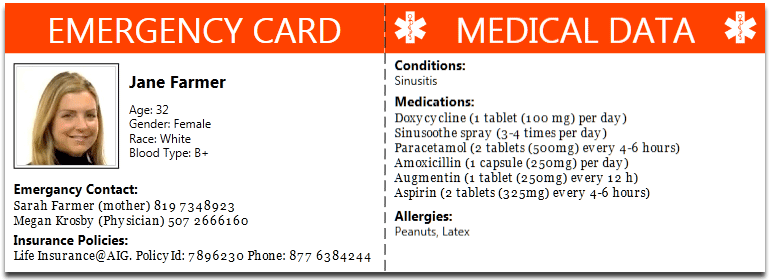
ICE – that’s In Case of Emergency
Recent discussion in U3A has been on what role a Group Convenor should have in case of emergency. It's a difficult one, I haven't fully resolved in my mind what responsibility I should have – I think it's one that's worth discussing. Should I, can I request that information be lodged with me? Should the group member provide it to a membership record on a database system that the Convenor can access? Or, should – and this is the purpose of this post – the individual take the responsibility upon themselves. This can be done by either carrying a card – this one is used by The Ramblers – there are many providers of this sort of card, eg ICEcard, or should we use the facilities on our Smartphones which allow access without unlocking the phone from the Home screen.
-

Decisions, decisions … Adobe Lightroom
A couple of U3A members have expressed an interest in purchasing Lightroom. It’s a confusing time in the Adobe world at the moment and the window for purchasing a stand-alone desktop version of the software (Version 6) is possibly closing, possibly … I don’t know!!
Adobe wants its users to move on to a Subscription-based Photography Plan which includes access and use of Photoshop as well as Lightroom, or alternatively a new Lightroom Creative Cloud Plan that is cloud-based with loads of cloud-storage and access to just Lightroom.
I decided to join the original plan about two years ago, and I hadn’t regretted it (until recently), but it does involve an ongoing commitment of c.£10.10 (currently) per month to allow you to keep editing your photos. If you cancel your subscription you can still access them, but the main editing functions are disabled. On the plus side you are provided with all the updates and new versions of the software whilst you still pay your subscription. As it was the main piece of photo software I used – it was a no-brainer for me back in 2015.
When I moved from Lightroom v.5 back in 2015, I opted for the Adobe Photography (20Gb) Plan Creative Cloud subscription. This is obtained from this link.
However beware. Adobe are pushing the cloud based service, rather than Lightroom as a desktop application, and are confusingly using the name of the old subscription Desktop application – Lightroom CC – to describe the mobile-world, cloud-based version which they are trying to push to the consumer market.
The desktop application is however ALSO part of the Photography Plan and IN MY HUMBLE OPINION this is the one you should be installing if you opt for the Photography Plan. It’s NOW called Lightroom Classic CC. This is the version that I upgraded to in the New Year – you could call it Lightroom 7.
However, as I said at the top of the message; if you just want a standalone, one-off purchase of Lightroom v.6 with a CD, it’s still available from Amazon for instance (also John Lewis, Curry’s and PC World I believe), or from Adobe direct.
Installing the standalone version from Adobe is relatively straightforward. You need to create an AdobeID as part of the process, and then you get a Licence Key. If you want to save c.£6 and NOT have the CD you can get it as a download to install the software – see the links from the Amazon page to get the “ xxx Activation code by email” version.
If you have an earlier version of Lightroom (e.g. v 4 & 5) you can upgrade it from this link and save yourself about 50% on the purchase price of Lightroom v.6, and if you’ve installed the Lightroom CC trial here’s a link if you want to change to Lightroom v.6.
Now this is important. Lightroom v.6 will not be upgraded in the future. It is not straightforward to go back to Lightroom 6 from Lightroom Classic CC (v.7) without losing some of the information you’ve applied with that later version. However for the amateur photographer there is plenty in Lightroom 6 and unless you’re thinking of buying some very expensive camera bodies and lenses in the future you probably won’t suffer from just using Lightroom v.6.
Installation assistance for Lightroom 6 is provided here.
If you decide to go down the Creative Cloud subscription route (as I did initially), you should be careful during the installation process, and you may find it useful to follow the assistance provided in this link.
If you want to ask me any questions before making a decision, don’t hesitate to do so, it will be my pleasure to try and answer them. If I can’t answer the question I will point you to a link which I think will answer the question.
So what is my recommendation? This matter has taken up a lot of my time just recently and I’ve agonised over the decision I should make. You can read about my reasoning and the decision I eventually made to probably stay with Lightroom v.6 whilst trying out Lightroom Classic in this blogpost.