
Tag: Apple
-
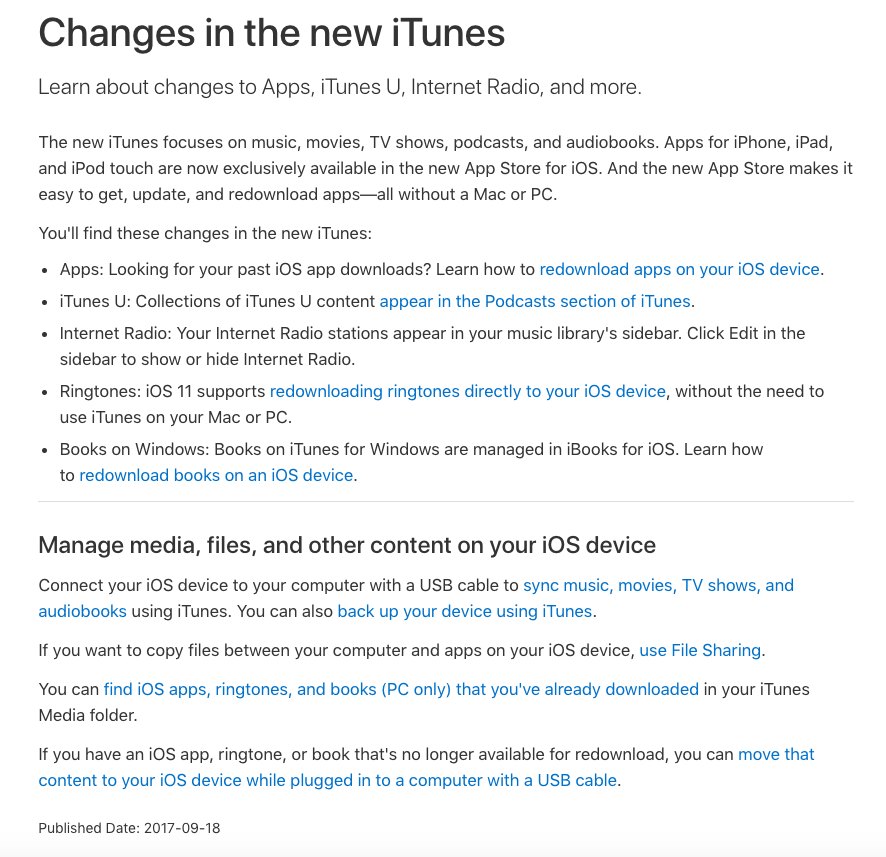
I hate iTunes!!!
It’s that time of the year when Apple give us a new version of iOS for the iPhone and iPad, and also sometimes releases a new version of MacOS, the operating system for their laptops and desktops. A few other things creep in such as this “upgrade” – more like a wholesale change – to iTunes which may impact upon your use of your iPhone/iPad.
I’m honestly not sure what difference it will mean to me, or to anyone else, but just alerting you to the fact that if you have automatic updates on for iTunes that things might not be the same as they were. That’s why I don’t allow automatic updates. I want to hear from other people about the impact of an upgrade, and for the software developer to release a couple of “bug fixes” before I do the upgrade manually, in my own time, and hopefully better informed and aware.
In the case of this one, I did the manual upgrade, as I didn’t think it would impact upon me too much and then spent a lot of the rest of the day sorting out my iTunes Library. I know my setup is a little complex – I’ll share that story with you another time – but iTunes must be my most hated piece of software. I just wish they would re-write it from the bottom up and get their database functionally correct and usable. -
Getting started with Digital Photography: Part 1
A new venture for Thought grazing …
This article starts from the assumption that you already have a digital camera, or smartphone, and doesn’t pretend to give advice on how to proceed to purchase one except to say that I would strongly recommend buying from a camera shop for the after-sales service you would get. In buying a digital camera you’re buying into a system – Canon, Nikon, Sony, Fuji, Panasonic etc. – it can be a painful (and expensive) decision to change later, so it’s worth talking to someone who can talk about their experiences, or who can match your needs to what is available.So therefore this article focusses on the software and in later posts – the processing of images using software.
Photography is a hobby that cries out to share its results (images) with other people and so therefore it’s best to work back from answering the question – what are you going to do with the images? By answering that question, the rest of the toolkit and the workflow you adopt is easier to answer. Typical workflows might be …
I just want to take a photo and print it.
I want to take a photo and possibly share it on Facebook, Instagram.
I want to take photos and make them into photobooks.
I want to take photos and post them to a website.
… of course it could be all of the above. One thing tends to unite them however, you need a place in the cloud to store your photos, from which you can then share them. If at all possible you should adopt a platform t
hat provides the maximum flexibility to allow you to do all of the above, and more, so that you don’t need to keep changing your systems as you develop your hobby. I’ve written about my workflow here.
So apart from the local USB disk-storage I use (with its backups, of course) to store and post-process my images, I use Google Photos as my main way of sharing photos in albums eg Orchids from Changi Airport, linked to the free storage (as long as you don’t store images at high resolution) you get on Google Drive. I do have other cloud storage/sharing platforms, but this is the one I use for photographs. I do also have a flickr account to share images – and I use it occasionally, as I do Instagram. As you develop your interest in photography, you may wish to have a more professional platform (I have used 500px), or the sharing platform that may be provided by your preferred software supplier (eg Adobe).
If you’re starting-out (or don’t want to spend any money) then you can use the editing software available within Google Photos, or if on a phone, or tablet, use Google’s Snapseed apps. You can still get Picasa for Windows
and the Mac, which is software Google bought and supported for a while, but it is probably better to bite the bullet and use their Photos app in a browser, as it integrates well with Drive and Google+.
Then of course you might (like me) be an Apple user, and could of course use their Photos app and iCloud, but at the moment the editing facilities offered in the app are not (in my humble opinion) as good as Google’s. You can sync your smartphone “camera roll” to Google Photos automatically which is nice.
Other free photo-editing options are available. I will however after reviewing the other possibilities, only mention and discuss Google Photos on this blog.
 If you’re a bit more sure that you want to invest in digital photography then there’s no better (imho) software than Adobe Lightroom. I’m not going into a whole set of reasons why you should invest in Lightroom rather than Photoshop Elements, or Apple’s Photo app, Paintshop, or even full-blown Photoshop. However for me these are the main benefits …
- It doesn’t matter where your images are stored; you don’t have to import them into a database, but you can choose to import new images into a single location of your choice which is unconnected to the software.
- It employs a catalogue which references where the images are stored. You can have multiple catalogues referencing the same set of images.
- All changes (edits) to the images are stored in the catalogue.
- The original images are left untouched. This is called non-destructive editing.
- You can go backwards and forwards through your edits, and can even create multiple virtual copies that allow you multiple versions of the same image, but only one actual (original) image.
- You can store your images in Collections which equate to virtual albums unconnected to the actual folders the actual images are stored in.
- You are supplied with a huge range of Plugins to allow you easy publishing to social media sites (eg flickr, Instagram, Dropbox), in addition to publishing to photobook websites (eg Blurb) and print sites (eg Smugmug).
- You can apply presets to your images at import, developing or export so that the same look and feel can be achieved.
- It integrates well with a whole range of other software such as WordPress (for blogging).
… I just feel that (for me at least) Lightroom is the best at the moment and it integrates with Adobe’s other software. It also now has a mobile version that allows editing on your iPad (or iPhone) if you subscribe to their Photography Creative Cloud Plan. This costs c.£9 a month and gives me both Lightroom and Photoshop, storage space in the cloud, and more besides, plus all the upgrades.
If you decide to go down the Lightroom route then here are a couple of resources you might wish to reference …Laura Shoe’s Lightroom – http://laurashoe.com/Lightroom Killer Tips – http://lightroomkillertips.com/
Adobe Training – http://tv.adobe.com/product/lightroom/ and https://helpx.adobe.com/lightroom/tutorials.html
… and for Lightroom tuition, you’ll do well to beat …
Scott Kelby’s Lightroom books for digital photographers, New Riders