Category: Archive

  • Notes from Zoom meeting – 18th February 2021

    I’m afraid the what had become the norm, delayed posting of notes has returned, so apologies for the late publication of these notes.

    We welcomed a new member – Steve Jones – and I notice that there are a couple of new members hoping to join us for our next meeting too. So you’ll all have to be on your best behaviour!

    I quickly followed up some issues from the previous meeting. Marie-Christine’s problem with Lightroom and Windows I’d dealt with in an email exchange but it might be that a bug-fix update to Lightroom was necessary to get a proper resolution. Jenny was not present at the meeting but Fred reported back on the National Pensioners Convention launch event on Tuesday 9th February. David Hughes had been challenged with his phone switching away from WiFi for calls and pushing his 4G calls bill up – we had advised on settings for WiFi calling and this now appeared to be working fine. Renee reported that her problems with alarm services and TV satellite were now fixed. Sianed was pleased to be able to report that she’d followed up our advice on howe to get her TV SMART once again by purchasing one of the many devices we’d suggested.

    I quickly ran through some of the more interesting “news” items I’d posted on the Flipboard magazine.

    I also quickly ran through the Thought grazing website, membership options (if people left the group, or if they were non-members but members of Cardiff U3A). I talked briefly about WordPress editing, commenting on posts and encouraged people to use the Bulleting Boards (Forums and Topics).

    We seemed to spend a lot of time talking about COVID-19 and Jabs at this meeting – I wonder why. To that end, there were less than normal problems, issues, challenges and questions to discuss.

    Marilyn had bitten the bullet and upgraded her iMac to BigSur. All was fine with her Lightroom Classic installation.

    Owen gave further information on the Pixel issue mentioned in a Flipboard post and suggested we might like to consider using Pixel Block as a way to prevent information about us to be sent back to marketing departments of shops such as Sainsbury.

    Stella was very unhappy about the WiFi service in her house and wondered about signal boosters. As she was using a 4G internet service to her router we felt that the problem should be reported to her ISP – Three – before any additional kit was purchased.

    David Hughes reported on his interesting adventure into the world of online paying-in of cheques which was both instructive and interesting. His other query related to shared access to the apartments in his community at Penarth. Several solutions were offered. Whilst the popular option of a Keysafe got a lot of support, the possible insurance aspect of this must be taken into account. An alternative suggested by Fred were using a MasterSuite from Tunstall key set (all locks would have to be changed). Fred suggested contacting the Local Authority as they might have a preferred supplier.

    Steve had a strange problem which seemed to involve phonecalls re-booting his WiFi. I’m not sure we really got the bottom of that one.

    Jim was using Animatica to create slideshows of images with music coming from audacity. I look forward to watching the outcome of this project.

    Paul had been looking at his Google file storage with the intended changes to the way Google was going to charge for what had previously been free high-resolution (ie not original quality) images. As with most of us the world of Backup’n’sync is a bit of mystery too!

    Christine was still suffering problems with her WiFi when trying to play online bridge. The devices seem to freeze after 1hr 10mins when using Zoom – and yes it’s a paid-for account! Would Powerline Adapters help? She also commented upon Facebook ownership of Content – I disagreed with her son’s interpretation.

    Don Roadblocks – games???? He reported that a grandson was happy to download animation software and create a Lego film in about 3hrs. Incredible!

    Mike was having problems with his Bluetooth mouse and keyboard dying. We suggested buying a pair that would share the same USB port on his computer.

    Ann was examining the cost of her phone contract and weighing up options. EE against Skynet; 4G vs. Broadband. We await her conclusions.

    Me – I’d been mainly working on cataloguing videos and changing them to .MP4 format and archiving them onto the family website.

  • Last pass

    There is to  be a change to the free version of LastPass service.    At present, you  can use LastPass on as many devices as you like absolutely free. That’s changing on the 16th March.

    You’ll have to choose whether you want to use LastPass on computers or mobile devices   You won’t be able to use it on both unless you pay for the premium version.

    If you use it on both computers and mobile devices at the moment, choose which one to keep.  The first time you sign in to LastPass on or after the 16th, it’ll record which device you do it on.  That will become your free device type – so if you sign in first on your computer, you won’t be able to use the app any more (and vice versa).

    To keep access to both, you need to sign up for the premium version. If you upgrade before the 16th March, a full year costs £22 or £30 after.

  • Notes from Zoom meeting – 4th February 2021

    A large attendance yesterday, touching nineteen as shown above. We started with this – The Blue Ball – it’s mesmerising; the digital equivalent of those steel balls that swung on a cradle on execs desks in the seventies, remember them?

    I mentioned the emojipedia which I referenced in the last notes and offered to help anyone who wanted to get onto Signal at the end of the meeting. Then it was “round the screen” to find out what members had been up to, or were having difficulties, or issues, with.

    Margaret reported on two scams, one from Lloyds Bank (spelt Lloyd) and an “internet interruption” call/text which on traceback (which David H had done having received the same one) appeared to come from Caerphilly! On a more productive note she had been able to transfer a lot of treasured photos from her old laptop – which she’d been unable to upgrade to Windows 10 unfortunately (for a number of reasons, lapsed time, lack of memory) – to their desktop. I mentioned that Linux was still a possibility to revive the old laptop, we could look at that agin when we were all together in person. She also told us about a very pleasant experience attending virtually the Destinations Travel event, and informed us about the Stanfords Travel Writer Festival and the videos from the event which finished yesterday will be online from that site.

    Owen reported that following the last meeting, he’d replaced his Powerline Adaptors with new ones and was now getting much improved wired connection speed for his study.

    Don had been decorating for the past three weeks, that is when he wasn’t standing in the garden at a safe distance from the lead gas pipe he’d fractured in a wall, thinking it was redundant!

    Jim had got himself into “trouble” with Flickr for displaying a photo of some aubergines – this caused much mirth. He reported to me today that Flickr had apologised for slapping an “unsafe” rating on the picture, and it was now visible to everyone. He had also upgraded (on his new laptop) his copies of Audacity (audio editing) and PaintShop Pro (photo editing).

    LetterA 1B2

    Marie-Christine reported she was having a problem with her version of Lightroom and Windows. I offered to raise the matter on the Lightroom Queen Forum if she told me hat version of Lightroom, and the precise version of Windows she was having problems with.

    Fred reported that a switch to Signal was not getting any traction with his friends, and that he’d had an instance of PayPal phishing to contend with.

    David H added to Margaret’s description of the “internet will crash” scam. Someone asked where you should report such scams. The preferred method would appear to your ISP, in this case Sky, but Marie-Christine reminded us of Action Fraud (0300 123 2040) – is it a scam in itself? No it’s run by the police. Other tricks are to type the phone number of a caller into a browser and you’ll get an indication from Who Called Me? or Should I answer? Of course for an email you should look carefully at the email header address and type the domain into a browser to see if it’s genuine. David also asked whether it was possible to use WiFi for making telephone calls as the O2 signal in his apartment was so bad. The answer appears to be to activate WiFi calling for Android or iOS. David also reported that he was still not having any joy with his Times subscription on his iPad although it was working on his wife’s machine. I suggested that perhaps the subscription was limited to a fixed number of devices, and that perhaps deleting it from both machines and then re-installing it in order of preferences might solves the problem. Just a thought. Finally, he mentioned the possibility of adding people to a Netflix account and that his daughter had added them to her account and he was paying her £3 a month in gratitude – this being the cost of the extended subscription. It was pointed out that there was a similar option for Spotify, and the launch of Apple One scheme just recently was very similar. [NB The Spotify Family requires address verification; I’m not sure how this works but all members have to have “the same address” – work that one out yourself.]

    Mike had nothing to report.

    Renee reported some alarm issues ; problems with her satellite TV which required a factory reset eventually as the Italian channels had changed polarity (??) and just re-tuning didn’t solve the problem.

    Stella had nothing to report.

    John told us about the problems that have dogged them since he lost a bank card and the issues of not knowing whether a request to change details for a direct debit (because it use the former 16-digit number) was a scam or not. Just a nuisance. He wondered whether there were more scams at large currently because of Covid. Not sure. He reported with some delight success in transferring a SIM from an old phone to a new iPhone XR. There were some problems initially (with O2) but these were now resolved and he was getting the service he wanted at the reduced price of the service on the old phone. My standard advice is never to buy a phone on a plan, but to always save up for “the next one” when you purchase outright a new one. Also look at the plans that are available for SIM-only, or Pay as you Go. Measure up what you can get against the ones offered by GiffGaff (running on the O2 network and owned by them), which is my personal recommendation.

    Paul had nothing to report, having been too sore to think of anything else but finding a comfortable place to sit since his accidental encounter with his loft.

    Phil told us about a Facebook page – Strange things found in walls, including a safe and a gothic arch. He also told us about his experience (relating to Jim’s Flickr episode) of the poor performance of content-filtering for schools internet when he was working.

    Ted told us about Just Watch – a really useful website that tells you which streaming service you should look on to find films, etc. He also mentioned how useful he was finding the Snipping Tool in Windows to cut-out an element from an image. I was able to say that the Screenshot Utility in MacOS did the same thing, but there were also short-key sequences for the Mac that did the same thing.

    Sianed relayed the sad story of the Smart TV that had lost its smart functionality. For many of us that’s a cause for celebration as the smart functionality decreases with the age of a set as manufacturers don’t keep their apps up-to-date. So now she is in the happy position of using possibly an Amazon Firestick, a Google Chromecast (although Paul doesn’t rate it as there appears to a lot of US-content), a Now TV dongle, a Roku device or an Apple TV. Here’s a recent review of all of the ones available in the UK.

    Finally Jenny described the National Pensioners Convention (Wales) event that she was participating in on Tuesday (9th February). You are encouraged to sign-up and take part in the webinar – I’ve circulated details by email earlier. She particularly noted the work of the Good Things Foundation and the Carnegie Trust in supporting digital inclusion activity and projects. She recommended looking at the former’s website.

    I concluded the meeting with a gallop through home networking and router configuration which is all written up in this article which builds upon earlier ones.

  • Notes from Zoom meeting – 21st January 2021

    Apologies (again) for the late arrival of these notes. Covid is certainly slowing me down – is that the same for you!!?? We kicked-off by going round the screen, several members had nothing to raise, no IT-problems is a Critical Success Factor for the group. Am I doing something right? {Don’t answer that.}

    Owen described the installation of his Vodafone 5G Broadband service which he’s written up in this post. It’s an interesting development and points to the future of rural broadband as well … maybe. Certainly a more environmentally friendly alternative, but you need to ensure that there’s take-up/adoption, and of course hills can make construction of such a network very costly. But, for rural Pen-y-Lan in a cable desert it’s a winner!

    Sianed had been having problems with OpenReach after damage to the cable feeding her property. Hopefully that’s now been resolved.

    Ted was experiencing contention issues due to the increased number of devices using his home network with his son now living in the house as well. The same son had improved the performance by disabling one of the channels on the router. This led to a short discussion on wavelengths and channels used by the router and suggests that a repeat session on that topic might be worthwhile. {I’m going to do that at the next meeting on Thu 4th Feb.} He was also having some difficulty with adapting to the new WordPress Block Editor for his Family History blogs. I sympathised, but urger him to stick with it, I’d now made the switch and was finding it SO MUCH better! I suggested that perhaps a “special” extra session on WordPress might be worthwhile and possible?

    David Hughes was experiencing problems with getting The Times on his iPad, whilst it was running on his wife’s. We ran through a number of possible solutions, which David had already attempted, so we were left with a puzzle which was not very helpful for David as he had been experiencing language challenges with the offshore IT Support Desk. {Is that me being sufficiently political correct?}

    Fred praised the steps that Cardiff County Council had made towards inclusivity for those who were threatened by digital exclusion with the distribution of tablets, and adoption of new policies. He was also having much more pressing difficulties with a kitchen roof which he’d not been able to have fixed until a date in February. We sympathised with the challenges of someone moving to a new area and not having the list of useful contacts. To this end Christine offered me the contact details of a roofer – thanks!

    Mike was enjoying his better broadband at reduced price. Great!

    Renee had an interesting problem which was she had a satellite receiver dish with no manual and was having difficulty in making it work. I offered to supply a link to a manuals site that I’d used to good effect. Here are a couple – https://www.usermanuals.tech/ and https://www.manualslib.com/ – there are others. Someone (Paul or Phil ??) did suggest perhaps using a laptop with USB, rather than trying to connect to her TV. We await developments with interest. She also wondered whether there was anywhere you could look to find the meaning of emojis, there is – here it is Emojipedia.

    Jim reviewed his difficulties with using an additional SD-Card for his new phone and thanked Paul for resolving the problem. He was now saving his photos on the card, and not using it as extended SIM memory. he also told us about his decision to take out a subscription to Google Drive/Photos to ensure that he could save his photos (taken with his phone) on Google at Original Quality. I expressed the view that perhaps this would not be an issue for smartphones as the limit for High Quality was 16Mp {most smartphones being 12Mp}. I sent him this link – Google Photos “High quality” vs “Original”: What’s the difference and should you care – which you might be interested in which compared different compressions with Google Photos.

    Christine was still having difficulties with her WiFi still losing service when she was trying to play chess with another user (her husband) in another room in the same house. I suggested that this might be an issue which we could solve with our session on router configuration {see above}.

    Phil was revelling in having discovered how good Google Docs is! {He ought to look at LibreOffice as well} It’s good to have a personal recommendation and I concur … why people are still paying money to Microsoft for Office when there’s free and open source alternatives that read .docx formats (and in the case of LibreOffice – write .docx), is a puzzle to me! He was also wondering whether anyone had come across an online version of Cluedo; he had updated his favourite gadget – his Firestick; and showed us how to move Zoom windows. Oh! Bliss!

    That means that Marie-Christine, Ann (who had to leave the meeting), Margaret and Marilyn had no issues to raise.

    So what have I been up to? The greatest success has been able to get my new Sony Bluetooth headphones working so that I can listen to music and not disturb anyone! Other than that I’ve been in organisation mood. I’ve sorted out my cloud drives – Google, iCloud and Dropbox so that they all have a distinct and different purpose; respectively photos and webwork, documents and archiving/backup. A lengthy job that I couldn’t have managed without dupeGuru, a rapidly favourite bit of Mac software. I then went on to start deleting duplicate (of which there were many) family history records. Duplicates are a pain in the neck – you never know whether you’ve got exactly the right one. That’s where dupeGuru comes in. I did have an anxious moment however when Dropbox informed me I’d deleted over 20,000 files. I restored them just in case, which put me back half-a-day; I hadn’t made a mistake!!! A neighbour across the road stores a backup disk of my photos and so I recovered that and did a backup and returned it to them. I do this every year. I have back-ups on an external disk connected to the computer as well for day-to-day use.I upgraded a few apps; removed Flash – hope you’ve done that too! However most of what I did was connected with my concerns with WhatsApp and it’s changes to it’s Privacy Policy.

    We had a discussion on this – or rather I spoke at length of my concerns. They appear in three places – this blog; on the public – Thought grazing and my personal blog – Just thoughts. I won’t say any more at this time, but I will be reviewing my use of WhatsApp (in particular) before the new deadline of May 15th; and will be considering leaving Facebook and instagram after removing my content – a subject for a meeting at a later date when they decide to move away from Ireland.

  • Notes from Zoom meeting – 17th December 2020

    I didn’t do any Notes from the Meeting which was a Christmas Quiz hosted by Phil Edwards, but Jim obliged with a photo – sorry for the delay in posting; I’d left it as a draft post. Duh!

  • Notes from Zoom meeting – 3rd December 2020

    “The Rogues Gallery”

    I think this might have been our largest attendance at a zoom meeting and as usual we had a lively discussion with a lot of good craic.

    I kicked off with a quick follow-up from the previous meeting on 19th November, I wondered whether David H’s issues with Linux on his wife’s laptop might be due to missing a setting for US/UK keyboard during install, and Phil supported this view. We agreed to look at this again when we could meet in person. We briefly discussed the session with Digital Communities Wales and confirmed that we’d now wait to see what the Cardiff U3A Exec wanted to do about digital inclusion for our members. Phil noted that Cardiff City Council were now promoting a scheme to provide equipment to those on benefit. We noted a couple of new scams involving HSBC, Amazon and DPD – these had been reported on our WhatsApp group. Thanks. I also gave a quick demonstration on editing in the new WordPress Block editor and pointed to the Help files that might be of assistance too. Finally I drew members attention again to the Flipboard magazine and the link to it that now appears under the Computer Group menu.

    We then went “round the screen”.

    John was having some issues with his use of Lightroom Classic – I suggested that he brought this up at the next session of the Lightroom Pantry Group. [He did, and we then had a follow-up session]

    Renee was experiencing a strange behaviour when using Powerpoint and Zoom (with Screen Sharing) where her cursor (on a Mac) seemed to disappear. I couldn’t think of any reason why this might be. Hopefully, it will resolve itself 🙂

    Margaret described a very sorry tale connected to her “smart” hearing aid, an app that couldn’t be upgraded and the inability to pair the aid to her phone. Hopefully there will be a positive outcome but unfortunately this is only too likely to happen as suppliers don’t keep their apps up–to-date with changing technologies. She also advised that she’d managed to resolve her printer problem (from the previous meeting) after she’d found an old cartridge which when fitted had allowed the printer to spring back into life!

    Christine described a problem that she was experiencing when using WiFi on her new Lenovo Chromebook. When connected to the same network and sitting near to another machine to play chess there was a lot of interference. I said this happened to me as well and the only solution would probably be to sit further apart – even in different rooms. It will be interesting to see whether this problem can be resolved.

    Sianed told us about a C4 series on Amazon and noted that Amazon was increasingly being used as a search engine (rather than Google). I can understand why. Often I do a Google search that then leads me to click on a link to Amazon – why use Google in such a scenario!!!

    Jim advised us that he hadn’t yet decided on his new laptop.

    David H told us about the saga of the M&S hamper to his grand-daughter which led to it being left on the doorstep of her house fronting the street. When he’d complained he was impressed at the way the company had responded. Good customer service.

    Paul was having some difficulty with his Google Contacts. He would report back on his progress. He also told the group that Aldi were now doing Click’n’Collect.

    Marilyn was still having problems with her external SSD (MacOS) and was going to back-up the disk and re-format it as APFS as she now felt there was little need to have it formatted as Ex-FAT (for MS-DOS/Windows compatibility).

    Stella was having problems with LastPass – I’m afraid my notes/memory on what it was fails me. Sorry. She also had reported a scam from 3 to the authorities.

    Marie-Christine reported that the OU Photography course she’d hoped to have followed had to be abandoned due to a hack of the URL for the course. She had been recompensed however.

    Mario asked about the nature of WordPress. I gave a brief outline of what it was and why it was not just a blogging platform but a website design and delivery tool in its own right.

    Don reported that after the previous meeting in trying to improve performance of his machine, he’d removed unused extensions from his Chrome browser and this had helped. He also described how he’d solved a problem of being unable to do double-sided printing from Word 2007 by emailing the document and then printing from the email. Magic!! He also reported that he’d had excellent customer service recently from Amazon in the matter of a wildlife camera he’d purchased.

    Ann gave a big thumbs-up to Paul for his advice on purchasing a kit to copy VCR to DVD. She was glad she’d spent a little more to get a kit with a Help Tutorial guide but reported that the transfer was not quick!! She also advised us that Google Play was no longer available (needs clarification – not sure what this refers to) and that she was still having problems with the Sky Internet Service slowing down.

    Finally Mike announced that he was well-satisfied by his upgrade for less cost from TalkTalk – to their Fibre65 plan. It was better and cheaper. Isn’t it a shame that you have to lobby and threaten people to get the service you require, which is not what they’re delivering.

    Again, we’d run out of time, so my proposed session on Google settings had to be postponed. I may actually write it up as a blog post instead.

  • You, groups, flickr and privacy

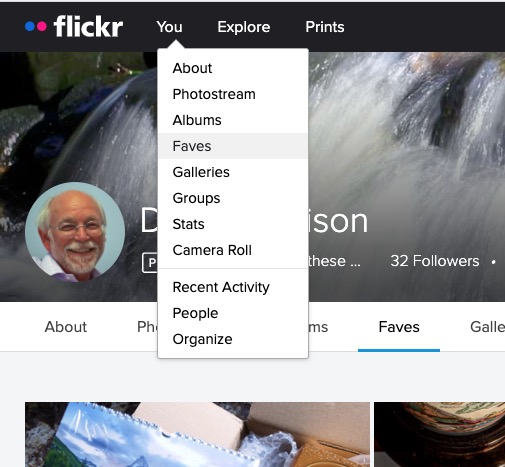
    Most of the time people join flickr to showcase their photos, to get faves, and to get comments (hopefully both positive and constructive) to enable them to improve their photography. The photos you upload are shown in your flickr Photostream (or Camera Roll) which you can browse and put into Albums. You can create your own Galleries of your (and other people’s) images; Fave images that appear in your Activity stream (see later) and Follow people whose photos you like.

    We’ll start by looking at the default privacy settings you can apply to the images you upload. The Settings page is accessed from your profile tab …
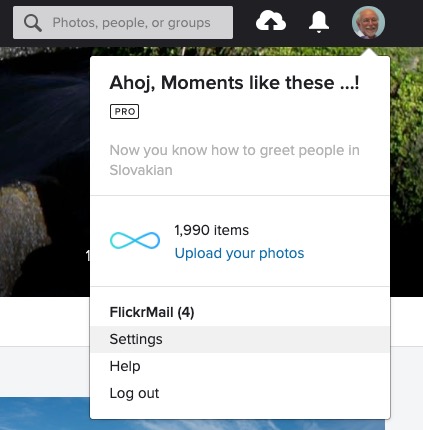
    … which gives you access to a page with these headings …

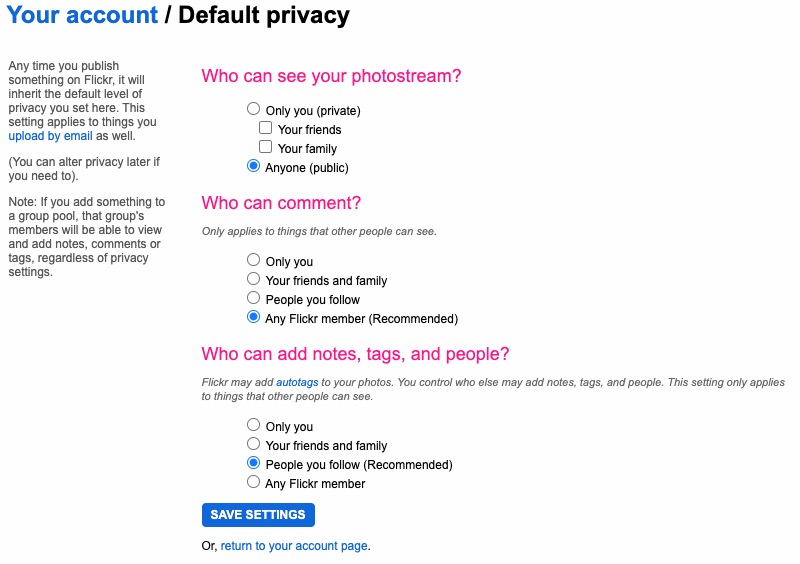
    … clicking on Privacy and Permissions brings up this screen – from which you should first look at Defaults for new uploads

    Read carefully the Note: “if you add something to a group pool, that group’s members will be able to view and add notes, comments or tags, regardless of privacy settings.” There’s no privacy within a group. All members of the group can see all members’ photos. If you’ve declared your image to have restricted viewing to Friends, or Family however they will not be visible for public viewing in the group, even though the group page might be visible for public viewing.

    After uploading your photos they will (unless you’ve changed the default settings) appear by default in the Activity stream which you can access from the flickr logo …
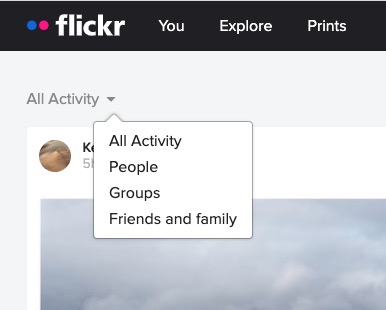
    … from which you will also be able to see the images of the people and groups you follow. This is the default view when you open Flickr on a mobile device.

    Any photo you fave is then attached to your account so that you can return to view it on a later occasion.
    It is also possible – unless you’ve prevented it – for someone to download the photo, or add it to their own Photostream as their own! You might wish to check your settings to prevent that happening.
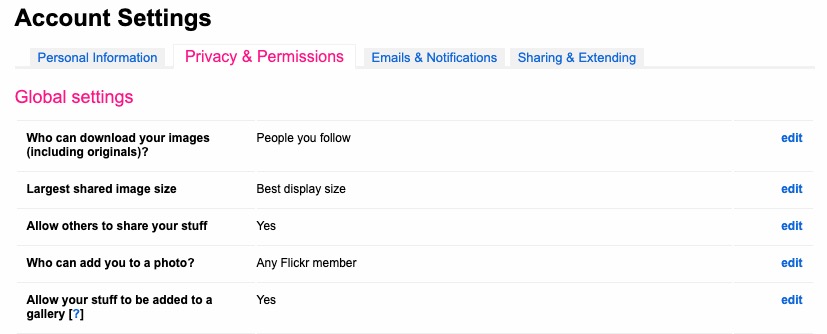
    … and …
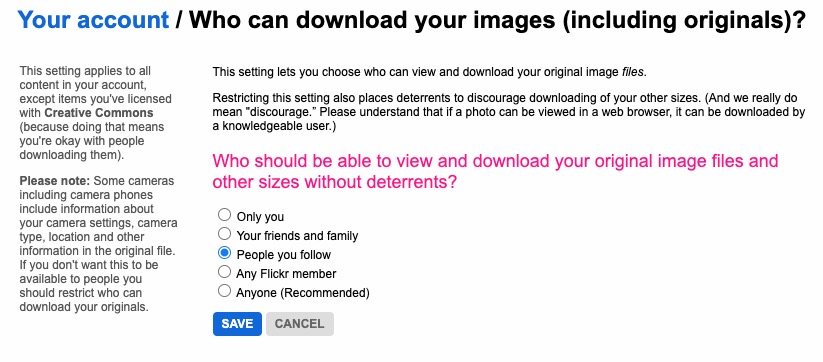
    … so it’s important that you know what you’re doing when you follow someone – I certainly wouldn’t recommend the default setting of “Anyone”.

    There are occasions however when you might wish to keep your photos completely private, or to share them privately within a Group. The settings in flickr to allow this are not exactly as intuitive as they might be so this post continues by seeking to help understand how you can “hide” your photos from the Public photostream, but to show them within a Group. Let’s start there.

    Groups can either be Public, open to invited membership (or upon application to join) and then also to be Private. Note especially carefully the note attached to Invite-Only Group which can be either Public or Private … “Anyone can view an Invite-Only group page …”

    The last case is obviously the most restrictive and in this situation a Group is setup by a Flickr member and they invite either existing Flickr members, or non-members to join the group.

    They will be sent an invite to join flickr, and the Group, as a member. You can therefore appreciate that you have to be a flickr member to view Photos which are in a Group. However if they’re not hidden from the Activity Stream by changing the default privacy settings (as above) and if it isn’t a Private group – they’ll still be visible to anyone unless you’ve also changed your search profile …

    For the Invite-Only Group which has not been declared Private it is important to note that anyone (even non-Flickr members) can view the group page, so as we shall next, if you want your photos to be completely invisible to the outside world, you’ll have to do something else to make them invisible!!

    If you want to keep your photos visible only to members of a Group, you need to specify on the Default privacy settings page either “Your friends”, or “Your family” depending upon the nature of the Group; similarly you should restrict Comments (and Notes, Tags and People) to “Your friends and family”.

    However these settings will then apply to every image that you upload and that might be more privacy than you really want, so you are able to choose the level of privacy on an image by image basis after you’ve uploaded them. This is done by looking at the information attached to an image after you’ve clicked on it in your Photostream …
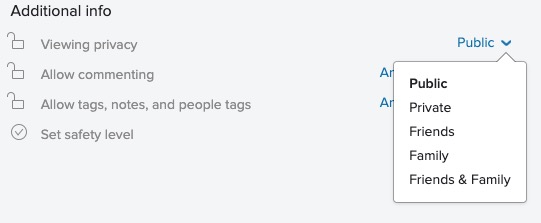
    … so, as an alternative, you could leave your Photostream relatively open using settings similar to the ones in the screenshots above and then restrict viewing of individual photos to Friends, or Family, etc. within Groups.

    I hope this helps.

  • Notes from Zoom meeting – 19th November 2020

    Got my act together this time, and sitting down quickly to write up the notes of the meeting which saw three guests attend – Tony Baines (the Vice-Chairperson of Cardiff U3A), Matthew Lloyd (on his last day as South East Programme Manager for Digital Communities Wales) and Jenny Phillips (their Wales Volunteer Co-ordinator).

    We started the meeting as normal by reviewing the Notes from the previous meeting and what had been on WhatsApp. I advised the group that there was now a link to the Thought grazing Flipboard “magazine” under the Computer Group tab on the website; I mentioned that I’d put some links to Which? articles on Black Friday on WhatsApp and would copy them into a Forum on the website asap; I’d written an article for the website on Purchasing a Laptop – copy’n’pasted from Which?; Paul had posted a screenshot of Google many years on, reflecting on how things had changed – Where is the Advanced Search these days???

    John had sent me some links in an email re. Surge Pricing which was something I’d not heard of before linked to Smart Meters. I also said I’d check whether there was anything on Which? about this issue. There isn’t. However, it seems to be an issue that emerged in 2018 (mainly in right-wing press, it has to be said) and all has gone quiet since then. There’s an interesting (and perhaps useful) discussion on the Smart Meter roll-out in this article, which also explains what Surge Pricing might mean and involve, as well as discussing where we are with SMETS 1 and SMETS 2 meters.

    I also reported in response to Anne’s query at the last meeting that I’d installed the Java Runtime Environment on my iMac and LibreOffic Base (their database) was then able to run.

    We noted Phil’s letter in “Age Matters” and Don had been having difficulties in wiping a Hard disk clean. [This was resolved by Don taking the machine to Neil and “donating” it to him on the basis that he’d wipe the disk clean as this was an issue with the version of XP (Home Edition) which was on the machine which didn’t allow a Format.] I also reported that I’d posted articles on URL shortening and Taking Screenshots on the website.

    David H thanked Phil in his absence for providing a second Linux USB stick and he’d tried to install it on an old laptop, but the keyboard had failed for some reason. They will return to visit the issue when they can meet in person. [Just a thought – it’s not something as obvious as US vs UK keyboards in the Linux setup???] However, they had received wonderful service from Curry’s who had delivered a new full-size iPad within a couple of days of ordering and he was most impressed at how easy it was to transfer everything from their old iPad Mini to the new machine. Renee confirmed it was a very straightforward and simple operation.

    Mike told us that he had been in conversation with TalkTalk re. his poor internet reception and had managed an upgrade to Fibre65 and had reduced his monthly charge from £32 to £42, Threatening to leave is an unfortunate but essential tool in the armoury of the consumer.

    Owen encouraged to read the reports and vote on the AGM motions on the Cardiff U3A website.

    Jim was still in the process of deciding on a laptop and wanted to get a 15″ one with audio input/output, HDMI and USB. It was suggested that he perhaps looked at: a) a smaller (and cheaper) laptop and using an external screen; b) getting a small desktop – this is what Marilyn had done last year – instead of a laptop if it wasn’t going to be needed outside the home; or even c) get a MacMini and use it with a large TV screen or external monitor. [Guess who suggested the latter, fired-up by the new Apple M1 MacMini launch the previous week.]

    Stella informed us that you needed to renew your iPlayer account every two years – I hadn’t realised that – and that she had experienced some fun and games in doing that before she managed to do it from her phone – Voila, she said!

    Christine had decided to go for a laptop rather than a tablet, and this now enabled her and her husband to play online games, or quizes (??) separately; she also advised us about disabling Face Recognition in Facebook. [Note to self: I think we ought to have an annual session on Facebook settings as well as the Google account one I committed to last time.]

    Don recounted his issues with scrubbing his hard disk (mentioned above); had been writing a report on church matters and had been playing online chess with his grandson.

    Renee cheered me up by saying that she’d been reading the meeting notes and had downloaded bit.ly; taken screenshots and was now using Brave and LastPass – makes my ramblings so much more worthwhile when someone follows up on things. Thanks.

    Paul had suffered from problems with his BT Home Hub Mesh setup and after not being able to fault resolve over the phone; the engineer (from the North East of England) had arranged the dispatch of replacement units – which were now working well. He also brought us up to speed with his look at Cardiff County Council’s website for Digital Inclusion (referenced in the last set of meeting notes.

    This was a good introduction to Fred and Jenny bringing us to speed on what they’d done (mainly referenced in my late set of meeting notes from last time) and which then led into a general discussion on how we would handle our guests who joined the meeting at about 3:00pm. I admitted Tony Baines to the meeting first and he explained his role (mainly concerned with Cardiff U3A strategy) and he described how we could see things in either an out-facing (to non-Cardiff U3A members), or in-facing (exclusively to Cardiff U3A members) – this was a useful distinction to bear in mind as we admitted Matthew and Jenny to the meeting.

    I gave a brief introduction about the Group, introduced Tony, and handed the meeting over to Matthew who presented through some slides. These are embedded below. He handed over to Jenny who described her role as helping, facilitating, training Digital Champions within communities and organisations. I believe that was the activity that she felt that DCW could offer to Cardiff U3A were we to identify some Digital Champions who would be working with Digital Companions who themselves would be alongside our members who felt they needed assistance to get online, etc.

    In questions they asked us to think how best they might get their message out; we identified the issue of “digital poverty” – the removal of a bus service and the replacement with an app to summons a personal bus on paper seems a good idea, but not if you’re not digitally aware, or confident.

    After they left the meeting we had a brief discussion on “what’s next” and asked Tony to consider whether in-facing digital awareness should be part of Cardiff U3A’s strategy for next year; I encouraged members of the Group to feed back to me their thoughts; and whether they could be digital champions, or digital companions. You can do that either through WhatsApp, or by email to me.

  • So you want a new laptop? [from Which?]

    How to buy the best laptop

    Five crucial questions you need to ask to find the perfect laptop.

    With hundreds of models to choose from, you’ll want to a laptop that ticks the boxes and will last the test of time. One of the biggest decisions will be how much you want to spend – what many don’t realise is that if you’re after a good all-rounder for day-to-day tasks, it doesn’t have to be a lot.

    We award Best Buys to our top-performing laptops, and our cheapest Best Buys costs less than £500. Plus if you’re willing to compromise you can find good models for as little as £150.

    Top five questions to ask before buying a laptop

    Before you start shopping for a laptop, it will help to know the answers to the following five key questions.

    1. How much should I spend on a laptop?

    • Less than £200 – Intel Celeron or Atom processors, 2GB of Ram and 32GB of storage. Won’t be particularly fast, but fine for note taking and browsing the internet.
    • Less than £400 – Intel Pentium, Core i3, AMD Ryzen 3 and 4GB Ram. Fast enough for web browsing and research work. Aim for a Full HD screen and an SSD if you can.
    • Less than £600 – Intel Core i5, i7, AMD Ryzen 5, 7 and 8GB of Ram. Should be ideal for photo editing and some light video work. Look for a thin and light design, a Full HD screen and an SSD.
    • Less than £800 – As above, but in increasingly high-end designs. Look for great battery life on premium ultrabooks.
    • More than £800 – Some stunning designs, great screens and good speakers. High-end laptops will suit more intensive tasks, such as video editing or playing games. You can buy Apple MacBooks from £950 and above.

    2. Operating system – what type of laptop do I need?

    There are three major players when it comes to the software (operating system) your computer runs on. Windows, MacOS, and ChromeOS.

    Buy a Windows 10 laptop if…

    • You prefer the familiarity of Windows
    • Have specialist software you can’t live without
    • Want a big variety of laptops to choose from

    Buy a MacBook if…

    • You have a budget of at least £950
    • Value longevity and build quality
    • Use other Apple products, or are happy to learn a new operating system

    Buy a Chromebook if…

    • You’re on a budget
    • Value simplicity
    • Don’t mind working in web-based applications

    3. How powerful does my laptop need to be?

    In short: If you need a laptop for light use and note taking, look for Intel Pentium or Intel Core i3 and at least 4GB of Ram for a great experience. Go for Intel Core i5 and i7 and AMD Ryzen 5 and 7 and at least 8GB of Ram if you’re a heavy user. Look for dedicated graphics from Nvidia and AMD if you want to game.

    Processing power really matters if you’re planning on using a laptop for photo or video editing, or are otherwise a very heavy user, opening lots of programs and browser tabs.

    When looking at laptop processors, you’ll see two main specifications beyond the product name: clock speed (measured in Gigahertz or GHz and number of cores) and Ram. Think of clock speed as the speed limit on a road and the number of cores as the number of lanes. As on a road, depending on traffic conditions – the tasks being done on your computer – a road might see a greater benefit from more lanes or a higher speed limit.

    In the simplest way possible, more of both is better, and all of our reviews describe what sort of tasks a laptop is good for.

    Think of Ram (Random Access Memory) like a desk and your hard drive like a filing cabinet. You pull files out of the cabinet and it takes a while, but once they’re on your desk, you can reach for them instantly. The same is true of Ram; once you have loaded a file from the hard drive, it’s now in the Ram and can be accessed almost instantaneously.

    The bigger the desk you have, the more items you can access more quickly, and the same goes for Ram. Most mid-range laptops come with at least 4GB of Ram, and we’d tend to recommend 8GB for people who are heavy web users or usually have lots of documents and pictures open.

    You can manage with less, but you’ll have to rein in your use. If you fill up your Ram, some of the things you’re working on will be moved back to the hard drive, making things feel a lot slower.

    Some cheap computers come with 2GB – this is usually fine on a cheap Chromebook, but some Windows 10 laptops will struggle.

    When you close a program or file, it is removed from the Ram and makes room for other things to be accessed immediately. This is part of the reason why closing programs you aren’t using can make your computer faster.

    4. Screen – what size and resolution of laptop display do I need? 

    In short: Unless you have a very low budget, don’t settle for less than Full HD, no matter the size.

    image072.jpg

    A laptop’s screen is one case where bigger isn’t always better. If you want a longer-lasting battery and a more portable device, you may want to go for an 11, 12 or 13-inch display; most of these will weigh between 1kg and 1.5kg.

    The largest you’re likely to see is 15 or 17 inches, with weight increasing to around 2kg to 3kg.

    Most machines on the shelves now have a Full-HD 1,920×1,080-pixel resolution display, and high-end models can have even sharper screens with even more pixels up to and beyond 4K Ultra HD. Generally, the higher the resolution, the sharper the picture.

    Only cheaper laptops should have a lower screen resolution of 1,366×768. This is fine for most people, but if you like to have lots of items on screen at once you’ll prefer a higher-resolution display.

    5. How much laptop storage do I really need?

    In short: Go for an SSD unless you really, really need more storage at all times. Storage capacity, measured in the size of the hard disk drive (HDD) in gigabytes (GB) or terabytes (TB, equal to 1,000GB), determines how many things your PC can hold.

    Documents, photos, music, movies, programs – they all take up space. Bigger is usually better, although solid-state drives (SSDs) are often more expensive for considerably less space. This is because they load much quicker and are completely silent.

    We’re also seeing a lot of cheaper laptops (including Chromebooks) carrying eMMC (embedded Multi-Media Controller) flash storage, which is slower than SSDs and gives you very little storage space.

    If you cleared out all the stuff on your computer you don’t actually need, how much space do you think you’d have? How much do you have now? Check ‘My Computer’ if you’re using Windows to gauge how big your next laptop’s storage needs to be.

    Laptop battery life: manufacturer claims vs reality

    In short: Manufacturer battery claims aren’t useful unless you’re only comparing models from the same brand. Use our reviews to get the full picture. Manufacturers often make heady claims about how long their laptops’ batteries last. Our tests ignore the manufacturer claims and involve multiple battery rundowns while simulating web browsing and watching videos.

    If you’re buying a portable laptop that you intend to use when travelling or on your commute, make sure the battery life is at least six hours based on our reviews. We’ve tested some models that last for more than 10 hours before they need recharging.

    But we’ve also found companies claiming 10 hours of battery life on average, while our own tests found 6.3 hours was closer to the mark.

    Battery stamina on large, desktop-replacement models won’t be as crucial, as they’ll almost always be near a power socket, but we still mark them down if they run out of juice in under four hours.

  • Screenshots on Windows and Macs

    It’s often useful to be able to send an image of your screen, or part of your screen to someone. In fact I use this facility all the time when creating these blog posts.

    On the Mac, it’s very easy …

    Press Cmd-Alt-3 to capture a complete screen

    Press Cmd-Alt-4 to draw a window that you want captured

    To be guided through the options you can

    Press Cmd-Alt-5 and from the Options screen decider where you want to save your Screen shots [I save them to a Dropbox folder so they’re available between my two machines], and also choose the option for the type of screen capture you want, or even to Record a series of actions.

    On the iPad/iPhone, it’s straightforward too. You can capture a screen by Pressing the Power Button and the Home Button together [It works best if you press the former just before you press the latter].

    To take a screen shot in Windows, I suggest you follow the advice in this post. Or alternatively watch this video …

    Jim has sent me this note as well …

    It might be helpful for your notes if I run through my Windows 10 sequence. The relevant key on my laptop is labelled SYSRQ/PRTSC, so I have to press the ALT key at the same time to print the screen. This puts the image onto the clipboard, so I then have to save it somewhere. I usually go to Paint Shop Pro and paste it as a new image. One thing I am investigating is what happens if you have two pages at once on the screen. At the moment I can only print one of the pages, depending on which I click on.