
Tag: privacy
-
Apple accounts – Sign in with Apple and Hide my email
[With grateful acknowledgment to Claude]
Do you need a paid subscription to open an Apple account and be able to Sign in with Apple?
No, you don’t need a paid subscription to open an Apple account or use Sign in with Apple. Creating an Apple ID (Apple account) is completely free and allows you to:
• Sign in with Apple on third-party websites and apps
• Access basic Apple services like the App Store
• Use iCloud’s free tier (with 5GB of storage)
• Make purchases in Apple’s digital stores
Paid subscriptions like Apple One or individual services (Apple Music, iCloud+ storage, etc.) are optional add-ons to your free Apple ID account.
To create an Apple ID, you just need an email address, a password, and some basic personal information. You can sign up directly on an Apple device or through the Apple website.What about Hide my Email address?
You’re asking about a good feature! Hide My Email is part of Apple’s privacy features, but it has different availability:
Free version:
• You can use Hide My Email when signing up for services with “Sign in with Apple” – this gives you a randomly generated email address that forwards to your real one
• This basic functionality is available to anyone with a free Apple ID
Paid version (requires iCloud+ subscription):
• The full-featured Hide My Email service that lets you create and manage multiple private email addresses anytime (not just when signing up for services)
• Create unlimited email addresses
• Manage all your private email addresses in Settings
• Use custom domain names with iCloud Mail
iCloud+ subscriptions start at $0.99/month for the 50GB plan, which includes the expanded Hide My Email functionality. The subscription also includes other privacy features like Private Relay and expanded HomeKit Secure Video support. -
How much privacy do I want/need?
What a question! Total of course might be the first answer, but is it actually the right one. It’s an entirely personal choice, and you have to weigh up how much you want to share of yourself online, how much personal information you need to share online, and how to secure that which you have to provide online to obtain services. Yes – it’s not an easy question to answer! But first some highlights …
UK Government forces Apple to remove Advanced Data Protection for its users in UK
New rules to protect your rights and activity online in the EU
… and the UK’s GDPR post-Brexit
What goes on in the US Defense establishment?
UK High Court forces Meta to consider a subscription model
Do you really need to do this to enter the US now?
The US CISA is seriously worried about protecting itself and its workers
How to avoid US-Based Digital Services—and Why You Might Want To
… and of course I couldn’t resist sharing this …
So where should we start. Well … I thought I’d just ask Perplexity and Claude to help me …
Perplexity advise me thus …
The amount of privacy you need or want depends on your personal values, lifestyle, and circumstances. Here are some considerations:

Factors Influencing Privacy Needs

	1.	Personal Boundaries: Privacy allows you to maintain control over sensitive information about yourself, such as financial, medical, or personal details.

	2.	Life Stage: Adolescents often need privacy to explore their identity and independence, while adults may seek it to protect personal data or maintain emotional boundaries.

	3.	Cultural and Social Context: In some environments, privacy can be a matter of safety (e.g., journalists in authoritarian regimes), while in others, it may be less critical.

Balancing Privacy and Openness
        •       Online Privacy: Use tools like password managers, VPNs, and privacy-conscious apps to protect your data.
	•	Relationships: Healthy relationships respect privacy but avoid secrecy that harms trust.
	•	Public Interactions: Avoid oversharing in public spaces or online forums to maintain control over your personal information.

Practical Steps
	•	Define what information you’re comfortable sharing.
	•	Use privacy tools to secure digital data.
	•	Communicate clearly about boundaries with others.
Ultimately, the right level of privacy is subjective and should align with your comfort level and values.
… whilst Claude “goes the extra mile” and provides me with a Comprehensive Personal Privacy Guide …
# Digital Privacy Mastery: Protecting Your Online Presence

## Digital Privacy Landscape

### Understanding Digital Privacy
Digital privacy is about controlling your personal information in the online world, protecting yourself from:
- Data collection and tracking
- Unauthorized access to personal information
- Potential misuse of your digital footprint
- Cybersecurity threats
- Online surveillance and profiling

### Digital Privacy Threat Landscape

#### Primary Digital Privacy Risks
1. **Data Harvesting**
   - Corporate data collection
   - Targeted advertising
   - Behavioral tracking
   - Comprehensive digital profiling

2. **Cybersecurity Vulnerabilities**
   - Personal data breaches
   - Identity theft
   - Financial fraud
   - Unauthorized account access

3. **Online Tracking Mechanisms**
   - Cookies and tracking technologies
   - Social media data mining
   - Search engine tracking
   - Cross-platform data sharing

### Digital Privacy Assessment Levels

#### Basic Digital Privacy (Beginner Level)
- Limited awareness of online tracking
- Minimal privacy settings
- Using default browser and app configurations
- Sharing personal information freely online

#### Intermediate Digital Privacy (Aware Level)
- Understanding basic tracking mechanisms
- Selective social media sharing
- Using some privacy tools
- Aware of potential online risks
- Implementing basic security measures

#### Advanced Digital Privacy (Expert Level)
- Comprehensive online protection strategy
- Minimal digital footprint
- Advanced encryption and anonymity tools
- Proactive threat monitoring
- Strategic online information management

### Comprehensive Digital Privacy Toolkit

#### 1. Personal Information Management
- Audit existing online accounts
- Minimize personal data sharing
- Use alternative/temporary contact information
- Create dedicated email addresses for different purposes

#### 2. Authentication and Access Control
1. **Password Management**
   - Use complex, unique passwords
   - Implement password manager
   - Enable two-factor authentication
   - Regularly update passwords

2. **Account Security**
   - Review app and service permissions
   - Disconnect unused accounts
   - Use privacy-focused authentication methods
   - Implement login alerts

#### 3. Browsing Privacy Techniques
1. **Anonymous Browsing**
   - Use privacy-focused browsers
   - Implement VPN services
   - Utilize browser privacy extensions
   - Enable do-not-track settings

2. **Tracking Prevention**
   - Block third-party cookies
   - Use anti-tracking browser extensions
   - Disable location tracking
   - Limit browser fingerprinting

#### 4. Social Media and Online Presence
1. **Platform Privacy Settings**
   - Minimize public profile information
   - Restrict personal data visibility
   - Control tagging and sharing permissions
   - Regularly audit connected applications

2. **Content Strategy**
   - Be selective about online sharing
   - Use pseudonyms when appropriate
   - Understand platform data policies
   - Implement content self-censorship

#### 5. Advanced Privacy Technologies
- Encrypted messaging apps
- Anonymous communication channels
- Decentralized network technologies
- Privacy-focused cloud services
- Secure file storage solutions

### Privacy Tools Recommendation

#### Essential Privacy Tools
1. **Browsers**
   - Brave
   - Mozilla Firefox (with privacy extensions)
   - Tor Browser

2. **VPN Services**
   - ProtonVPN
   - Mullvad
   - NordVPN

3. **Password Managers**
   - Bitwarden
   - 1Password
   - LastPass

4. **Tracking Blockers**
   - uBlock Origin
   - Privacy Badger
   - NoScript

5. **Encrypted Messaging**
   - Signal
   - Telegram (secret chats)
   - Wire

### Psychological and Practical Considerations

#### Digital Privacy Mindset
- Treat personal data as valuable asset
- Develop critical thinking about online sharing
- Stay informed about privacy technologies
- Cultivate a proactive privacy approach

#### Continuous Privacy Improvement
1. Regular privacy audits
2. Stay updated on emerging threats
3. Adapt privacy strategies
4. Learn from privacy best practices
5. Invest in privacy education

### Legal and Ethical Dimensions
- Understand data protection regulations
- Know your digital rights
- Recognize ethical data use
- Support privacy-focused initiatives

### Conclusion: Your Digital Privacy Journey
Digital privacy is an ongoing process of:
- Awareness
- Strategic management
- Continuous learning
- Technological adaptation

**Key Takeaway**: Your digital privacy is a personal responsibility and a fundamental right in the digital age.

### Action Plan
1. Conduct immediate privacy audit
2. Implement basic protection tools
3. Develop privacy-conscious habits
4. Continuously educate yourself
5. Regularly reassess your digital privacy strategy
… so with that, I might as well stop and let AI take over!!!! Here’s Claude’s presentation …
# Securing Your Digital Privacy

## Table of Contents
1. Understanding Digital Privacy
2. Risks in the Digital Landscape
3. Protective Strategies
4. Essential Tools and Techniques
5. Best Practices for Everyday Protection

---

## 1. Understanding Digital Privacy

### What is Digital Privacy?
Digital privacy is the protection of personal information in the online world, encompassing:
- Personal data protection
- Control over personal information sharing
- Prevention of unauthorized access to digital identities
- Maintaining anonymity and security in digital interactions

### Why Does Digital Privacy Matter?
- Prevent identity theft
- Protect personal and financial information
- Maintain personal autonomy
- Avoid targeted manipulation
- Safeguard professional and personal reputation

---

## 2. Risks in the Digital Landscape

### Common Digital Privacy Threats
- Data breaches
- Phishing attacks
- Social engineering
- Tracking and profiling
- Unauthorized data collection
- Malware and ransomware

### Potential Consequences
- Financial fraud
- Personal information exposure
- Reputation damage
- Stalking and harassment
- Professional and personal discrimination

---

## 3. Protective Strategies

### Personal Information Management
- Minimize personal data sharing
- Use privacy settings on social media
- Be cautious about online forms and surveys
- Regularly audit online accounts and permissions

### Digital Footprint Reduction
- Use pseudonyms when possible
- Limit personal information in public profiles
- Be mindful of location sharing
- Regularly delete unnecessary online accounts

---

## 4. Essential Tools and Techniques

### Privacy-Enhancing Technologies
1. **Virtual Private Networks (VPNs)**
   - Encrypt internet connection
   - Mask IP address
   - Recommended Services:
     * ProtonVPN
     * Mullvad VPN
     * NordVPN

2. **Secure Messaging Apps**
   - End-to-end encryption
   - Recommended Apps:
     * Signal
     * WhatsApp
     * Telegram (secret chats)

3. **Password Managers**
   - Generate and store complex passwords
   - Recommended Tools:
     * BitWarden
     * LastPass
     * 1Password

4. **Browser Privacy Tools**
   - Privacy-focused browsers
   - Browser extensions
   - Recommended Options:
     * Brave Browser
     * Firefox with privacy extensions
     * DuckDuckGo Privacy Browser

---

## 5. Best Practices for Everyday Protection

### Practical Privacy Tips
- Use two-factor authentication
- Regularly update software and devices
- Be skeptical of unsolicited communications
- Use unique passwords for each account
- Enable encryption on devices
- Avoid public Wi-Fi without VPN protection

### Online Behavior
- Think before posting
- Limit personal information sharing
- Be aware of app permissions
- Regularly review privacy settings
- Use privacy-focused search engines

---

## Additional Resources

### Recommended Websites
- [Electronic Frontier Foundation (EFF)](https://www.eff.org/)
- [Privacy Tools](https://privacytools.io/)
- [Have I Been Pwned](https://haveibeenpwned.com/)

### Learning More
- Take online privacy courses
- Follow cybersecurity blogs
- Stay informed about latest privacy technologies

---

## Conclusion

### Your Digital Privacy is Your Right
- Be proactive
- Stay informed
- Continuously educate yourself
- Protect your digital identity

*Remember: Digital privacy is an ongoing process, not a one-time solution!*
… that’s just too much to take-in isn’t it, so I think I still have a place, and I’ll simplify things down to just a few points – but please take note of both of these AI contributions as a checklist to visit and re-visit on a regular basis.
So my plan is to cover the following:
Safeguarding
- Cookies – Deny usually works (but you may need to temporarily switch off adblockers if the site is of particular value/importance to you – but remember to switch it back on afterwards. Alternatively – look for a different site that doesn’t impose that requirement. It’s nearly always imposed to get marketing information from you – what you’re doing, what you’re looking at, where you are, what you’re buying etc etc.
- Adblockers – these protect you from yourself to some extent, as you won’t see adverts that you might be tempted to click on; but they also remove invasive ads from appearing on your screen and interrupting your reading. They should also prevent pop-ups (in small windows) appearing – but be aware that some websites have this facility hard-wired into their code, so the best solution is to avoid such websites as you can’t switch-off the pop-ups. Claude gives advice on the best ad blockers available …
Choosing the best ad blocker depends on your specific needs, such as browser compatibility, customization options, and additional features like privacy protection. Here are some of the top ad blockers for different scenarios:

## Top Ad Blockers for 2025

### 1. **AdGuard**
   - **Best For:** System-wide ad blocking and broad compatibility across multiple browsers and devices.
   - **Features:** Offers robust app coverage, parental controls, browsing security, and a VPN. It has a user-friendly interface and provides detailed statistics on blocked ads.
   - **Compatibility:** Browsers, Windows, macOS, Android, and iOS.
   - **MV3 Compliance:** Yes, with a compliant beta extension for Chrome.
   - **Cost:** Starts at $29.88, with plans covering up to nine devices[1][2].

### 2. **uBlock Origin**
   - **Best For:** Customization and Firefox users.
   - **Features:** Highly customizable with the ability to add custom filters and scripts. It is free and open-source.
   - **Compatibility:** Primarily for browsers.
   - **MV3 Compliance:** No.
   - **Cost:** Free[1][3].

### 3. **Total Adblock**
   - **Best For:** Ease of use and YouTube/Facebook ad blocking.
   - **Features:** Blocks third-party trackers, improves page load times, and offers a premium plan with antivirus software.
   - **Compatibility:** Browsers.
   - **MV3 Compliance:** Currently unaffected but lacks a clear transition plan.
   - **Cost:** Free version available, with premium starting at $1.59/mo[2].

### 4. **Surfshark CleanWeb**
   - **Best For:** Unlimited devices and VPN integration.
   - **Features:** Blocks ads across multiple devices, including smart TVs, and offers VPN benefits like data encryption and phishing protection.
   - **Compatibility:** Unlimited devices, including smart TVs.
   - **MV3 Compliance:** Unaffected.
   - **Cost:** Bundled with Surfshark VPN[2].

### 5. **Ghostery**
   - **Best For:** Privacy-focused users.
   - **Features:** Offers anti-tracking features and detailed ad-blocking statistics.
   - **Compatibility:** Chromium-based browsers, Android, and iOS.
   - **MV3 Compliance:** Yes.
   - **Cost:** Free, with premium options available[1][3].

### 6. **Adblock Plus**
   - **Best For:** General ad blocking with acceptable ads feature.
   - **Features:** Allows acceptable ads to support websites, with a user-friendly interface.
   - **Compatibility:** Chrome and other browsers.
   - **MV3 Compliance:** Not specified.
   - **Cost:** Free[8].

### Comparison Table

| Ad Blocker | Best For | Compatibility | MV3 Compliance | Cost |
|------------|---------|---------------|----------------|------|
| AdGuard    | System-wide blocking | Browsers, Windows, macOS, Android, iOS | Yes | $29.88+ |
| uBlock Origin | Customization, Firefox | Browsers | No | Free |
| Total Adblock | Ease of use, YouTube/Facebook | Browsers | Unaffected | $1.59/mo+ |
| Surfshark CleanWeb | Unlimited devices, VPN | Unlimited devices | Unaffected | Bundled with VPN |
| Ghostery | Privacy features | Chromium-based browsers, Android, iOS | Yes | Free+ |
| Adblock Plus | General ad blocking | Chrome and other browsers | Not specified | Free |

Each of these ad blockers offers unique benefits depending on your priorities, whether it's customization, privacy, or ease of use.

Sources
[1] Best Ad Blockers of 2025 - Cookies https://www.aboutcookies.org.uk/ad-blockers
[2] Best Ad Blockers That Still Work in Chrome March 2025 https://allaboutcookies.org/best-ad-blockers-for-chrome
[3] The Best Ad Blockers for 2025 - PCMag https://www.pcmag.com/picks/best-ad-blockers
[4] What is the best AdBlocker for Chrome? (browser opinions aside) https://www.reddit.com/r/Adblock/comments/1ex5hyq/what_is_the_best_adblocker_for_chrome_browser/
[5] Best ad blockers of 2025 - TechRadar https://www.techradar.com/pro/best-ad-blockers
[6] AdBlock — block ads across the web - Chrome Web Store https://chromewebstore.google.com/detail/adblock-%E2%80%94-block-ads-acros/gighmmpiobklfepjocnamgkkbiglidom
[7] Best Ad Blocker 2025 | My top choices that REALLY work! - YouTube https://www.youtube.com/watch?v=92ITOpOxRcQ
[8] Adblock Plus | The world's #1 free ad blocker https://adblockplus.org
… add to this Magic Lasoo if you use Apple kit with the added benefit that it blocks ads on YouTube if you view through Safari [otherwise you’ll need to consider purchasing YouTube Premium at £12.99pm, which might be worth it if you’re a big YouTube watcher].
- Password managers
A subject we’ve looked at before; recommended password managers would be one from this article, 1Password has my son’s recommendation; but as you know I rely on the less feature-rich but very effective – within a 100% Apple environment – Password app (using iCloud Keychain)
- Two factor authentication (2FA)
You might care to look at this page from the BBC on 2FA as well – I would recommend using Authy, if you go down the third-party authenticator route
[A Postscript from Signal – 28/03/2025]
I don’t think I mentioned it yesterday but with an increasing number of apps, the two above included, you don’t need to provide login credentials, you can “Login with Apple” or Google, and I think Microsoft for some. This means the app account is tied to your Apple account (or whatever) and an anonymous userId is created which provides privacy as well as not needing to create a password as well.
Thus your Apple account (or whatever) provides a single sign on (SSO) option which provides increased privacy. This article – https://www.macworld.com/article/234043/sign-in-with-apple-faq-what-you-need-to-know-about-apples-single-sign-on.html – provides more information on the approach and makes the case for using SSO with Apple over other possibilities.
Having an Apple account (used to be called AppleID) is not restricted to having an Apple device either – https://macreports.com/what-you-can-do-with-an-apple-id-without-an-apple-device/ – so it might be worth considering getting one, if Privacy is important to you.
- Don’t proceed with Free option, or 7-day trial if ads appear immediately you take your first step (eg I followed after research a link to the best recommended software for a particular purpose, but after I downloaded it – no problems, I was immediately bombarded by ads when I started the app up with the plea to pay for an ad-free version), and don’t take the 10% off next purchase offer – this is a particularly insidious “trick” often linked to travel websites, where you are offered 15% off your next purchase, only to find that by clicking on the link you have to provide information, or permission, to send personal information to other businesses.
- Be mindful of links on purchase sites – similar to the above, but just be aware that the re-direction takes you away from the original website where you might have felt relatively safe. On that not, always use a Credit Card for online purchases (or Apple or Google Pay, or Paypal) as you’re provided with some protection against fraud.
- Beware of location tracking – switch-off all that don’t need your location to work. In your apps just be aware that not all apps need to know where you are – maps … yes; weather – maybe; asda – not really!
- Privacy settings in apps – Facebook, Google
Facebook (from Perplexity) …
To enhance your privacy on Facebook, here are key settings to adjust:

1. Control Who Sees Your Posts
Go to Settings & Privacy > Settings > Privacy.
Adjust the audience for your posts: choose "Friends," "Only Me," or customize it further. Avoid "Public" for maximum privacy.

2. Manage Profile Visibility
Edit your "About" section to limit shared details like work, education, and contact info. Set visibility to "Friends" or "Only Me".
Turn off search engine linking to your profile under Settings & Privacy > How People Find and Contact You.

3. Secure Your Account
Enable two-factor authentication and use a strong password.
Regularly review apps connected to your account and remove unnecessary ones.

4. Limit Old Posts
Use the "Limit Past Posts" option in Privacy Checkup to restrict visibility of older posts.

5. Control Tags and Posts on Your Profile
Under Profile and Tagging, decide who can post on your profile and who can see tagged posts. Set to "Friends" or stricter options.

6. Ad Preferences
Turn off personalized ads by reviewing ad preferences in Settings & Privacy > Ad Preferences.

Review these settings periodically for better privacy control!
… and remember my advice to logout from Facebook and Instagram after use. A belts and braces protection of your privacy.
Then for Google, start at accounts.google.com …

Screenshot Perplexity on Google Privacy settings gives me …
Google offers several privacy settings to help users control their data and online experience. Here are key privacy settings you should consider adjusting:

Web & App Activity
Turn off this master privacy control to limit Google's collection of your search history, location data, and app usage. To do this:
Go to any Google website
Click on your profile picture
Select "Google Account"
Navigate to "Data & Privacy"
Find "Web & App Activity" and turn it off

Location History
Disable location tracking by turning off both Web & App Activity and Timeline (formerly Location History). This prevents Google from storing detailed information about your movements.

Auto-Delete Options
If you prefer to keep some features enabled, set up auto-delete for your data:
Go to "Privacy & Personalization"
Select "Web & App Activity" or "Timeline"
Choose "Auto-delete" and set your preferred time period

Ad Personalization
Limit targeted advertising by adjusting these settings:
Go to "Privacy & Personalization"
Find "Ad Personalization"
Turn off personalized ads

Chrome Privacy Settings
For Chrome users, consider these adjustments:
Disable automatic sign-in: Settings > Sync and Google Services > Turn off "Allow Chrome Sign-In"
Sign out of Chrome: Click your profile picture > Sign out
Manage sync settings: Settings > Sync and Google Services > Manage What You Sync

Additional Controls
Review and limit data sharing with third-party apps and services
Use Google's Privacy Checkup tool to review and adjust your settings
Explore the "Data & Privacy" section in your Google Account for more options

Remember, while these settings can enhance your privacy, they may also affect some Google services' functionality. Regularly review and update your privacy settings to maintain your desired level of data protection.
Options you might consider …
- Subscription rather than free – a hobby horse of mine! If it’s worth using, it’s worth paying for – especially if it prevents your information being sold on to other sites, or marketing organisations.
- Privacy focussed solutions as a choice – Proton vs Google;
- Open source as a consideration – always investigate whether there is a FreeWare or DonationWare option, and then consider offering a subscription is requested – Wikipedia, Signal, Libre, etc etc
- Wise choices when downloading – be sure of the website before you download software
Here are some of the best sites for downloading safe freeware:

1. **FileHippo**
   - **Features**: Offers a wide range of current apps, categorized for easy navigation. Provides older versions of software, which can be useful if newer versions cause issues.
   - **Benefits**: Properly labels any additional software offers, making it easy to avoid unwanted downloads[2].

2. **Softpedia**
   - **Features**: Over 1 million software titles, regularly updated and checked for malware. Offers mirrors for previous versions of programs.
   - **Benefits**: Detailed descriptions, user reviews, and editor ratings help ensure safe downloads[1][2].

3. **MajorGeeks**
   - **Features**: Long-standing reputation for reliability, with a curated list of top freeware picks.
   - **Benefits**: Known for its trustworthiness, despite a somewhat outdated interface[2].

4. **SnapFiles**
   - **Features**: Highlights a "Freeware Pick" and a "Random Pick" to discover new apps. Includes user reviews and warnings about bundled software.
   - **Benefits**: Offers a section for portable programs, ideal for running apps without installation[2].

5. **Ninite**
   - **Features**: Allows downloading multiple apps at once, automatically rejecting toolbars and unwanted software.
   - **Benefits**: Ideal for setting up new PCs or reinstalling software securely, with background updates[2].

6. **Tucows**
   - **Features**: Established reputation with a wide range of software available.
   - **Benefits**: Known for reliability and safety, though less frequently updated[1].

7. **Portable Freeware**
   - **Features**: Curated directory focusing on portable freeware with comprehensive descriptions and user comments.
   - **Benefits**: Ensures software runs without installation and leaves no traces on the host machine[3].

8. **Chip.de/Chip.eu**
   - **Features**: Offers a variety of software with hints about potential toolbars or adware within the software itself.
   - **Benefits**: Known for avoiding adware wrappers in downloads[1].

9. **Nonags**
   - **Features**: Specializes in non-adware freeware, ensuring safe downloads.
   - **Benefits**: Ideal for those seeking software without bundled unwanted programs[1].

10. **GitHub**
    - **Features**: A platform primarily for open-source software development, offering a wide range of free and safe software.
    - **Benefits**: Software is often reviewed and audited by the community, ensuring safety and quality[3].

Sources
[1] what's your trusted site for freeware? (sourceforge ect.) : r/software https://www.reddit.com/r/software/comments/1xwokn/whats_your_trusted_site_for_freeware_sourceforge/
[2] Safest Websites to Download Windows Software - Bug Zero https://blog.bugzero.io/safest-websites-to-download-windows-software-ffff6b2e152b
[3] Best Website for downloading Freeware Software? - Bogleheads.org https://www.bogleheads.org/forum/viewtopic.php?t=404839
[4] The best free software that's completely safe (we've checked) https://www.which.co.uk/news/article/the-best-free-safe-software-ajW7U4V3dBVU
[5] CNET Download: Free Software Downloads and Reviews for ... https://download.cnet.com
[6] The 10 Safest Free Software Download Sites for Windows in 2023 https://www.youtube.com/watch?v=KCaTww_6YcY
[7] Top 10 Sites to Download Free PC Games Completely Safe and Legit https://www.movavi.com/learning-portal/sites-to-download-free-pc-games.html- A VPN offers a degree of protection (even with a cell connection)
Using a VPN while connected to a cellular internet connection is not strictly necessary but is highly recommended for several reasons:

### **Why Use a VPN on Cellular Data?**
1. **Enhanced Privacy**:
   - Cellular providers can track and log your online activity. A VPN encrypts your data, preventing your Internet Service Provider (ISP) from monitoring or selling your browsing habits[2][3][4].

2. **Increased Security**:
   - While cellular networks are generally more secure than public Wi-Fi, they are not immune to threats like phishing or malicious attacks. A VPN adds an extra layer of encryption to protect sensitive information[1][2][3].

3. **Bypass Geo-Restrictions and Throttling**:
   - A VPN allows you to spoof your IP address, enabling access to region-specific content or bypassing ISP throttling during high-bandwidth activities like streaming or gaming[2][3].

4. **Protection Against ISP Tampering**:
   - Some ISPs compress or modify website content for mobile browsing. A VPN ensures you access unaltered content[1].

### **When You Might Not Need a VPN**
- If your primary concern is casual browsing or using apps like WhatsApp or Facebook, and you trust your cellular provider, a VPN might not feel essential[5].
- Using a VPN increases data usage (by 5–15%) and can drain your battery faster, so it may not be ideal if you're on a limited data plan or low battery[1][2][4].

### **Conclusion**
While cellular networks are safer than public Wi-Fi, using a VPN enhances privacy and security. It is particularly valuable if you frequently handle sensitive data, want to avoid ISP tracking, or access geo-restricted content. However, consider the trade-offs in terms of data usage and battery life.

Sources
[1] Does a VPN work on mobile data? - Surfshark https://surfshark.com/blog/does-vpn-work-on-cellular-data
[2] Should you use a VPN when connected to cellular data? | Tom's Guide https://www.tomsguide.com/computing/vpns/should-you-use-a-vpn-when-connected-to-cellular-data
[3] Does VPN work on mobile data? - Cybernews https://cybernews.com/what-is-vpn/does-a-vpn-work-on-mobile-data/
[4] Does a VPN work without Wi-Fi? - NordVPN https://nordvpn.com/blog/does-vpn-work-without-wifi/
[5] Who here uses VPN when on mobile data? - Reddit https://www.reddit.com/r/VPN/comments/n8x2kv/who_here_uses_vpn_when_on_mobile_data/
[6] Do you need a VPN on your phone? Here's the truth. - Mashable https://mashable.com/article/do-you-need-a-vpn-on-your-phone
[7] Why You Need a VPN on Your Smartphone | McAfee Blog https://www.mcafee.com/blogs/mobile-security/privacy-please-why-a-vpn-on-your-smartphone-may-be-a-smart-move-for-you/
[8] Do I Really Need a VPN at Home? - PCMag https://www.pcmag.com/how-to/do-i-need-a-vpn-at-homeSo it’s up-to-you – how much privacy do you actually want; how much privacy do you need!
-
Privacy invasion
A single issue post to just alert folk to the murky world of credit reference agencies and their dual-role as data brokers – which I was (I’m ashamed to say) totally unaware of.
This came to my attention when I received an email from Experian – who I had an account with due to a data breach with my Pension provider which resulted in them giving members free 12-month access to their services – which advised that I had 19 “experienced” Soft Searches on my account with them. Now I’d not been seeking any credit recently, so this immediately sparked my interest and so I clicked on the link in the email (see above) and logged in to see what was happening. At which point I was greeted by this screen and the rather alarming sidebar, you can see here …
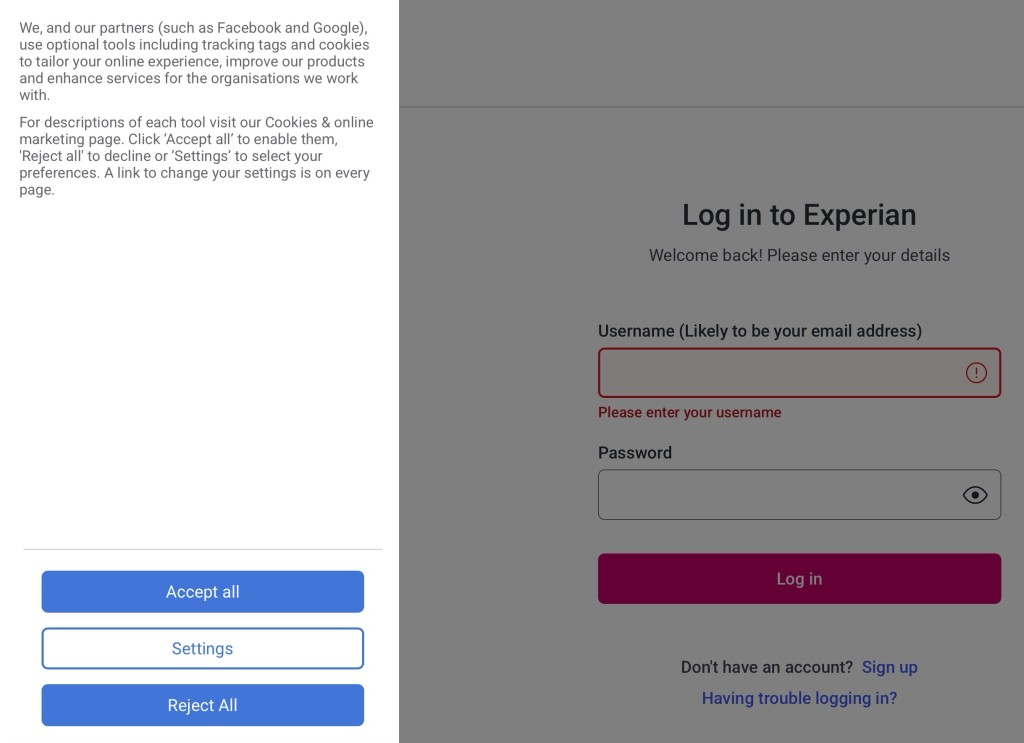
Screenshot … just ponder this for a moment. I had always assumed that Experian was a credit reference agency which provided a service to organisations wishing to extend credit to consumers and businesses to give an assessment of credit worthiness. Indeed when I had an account with them, I could see my score, and you were able to challenge that if you didn’t think it looked right. But that’s all immaterial to what I was seeing on the screen. I was being asked to accept that it was perfectly OK for Experian to share personal information with their partners which included Facebook and Google. What!!!!!!!!!
This got me going, so I clicked on Settings …
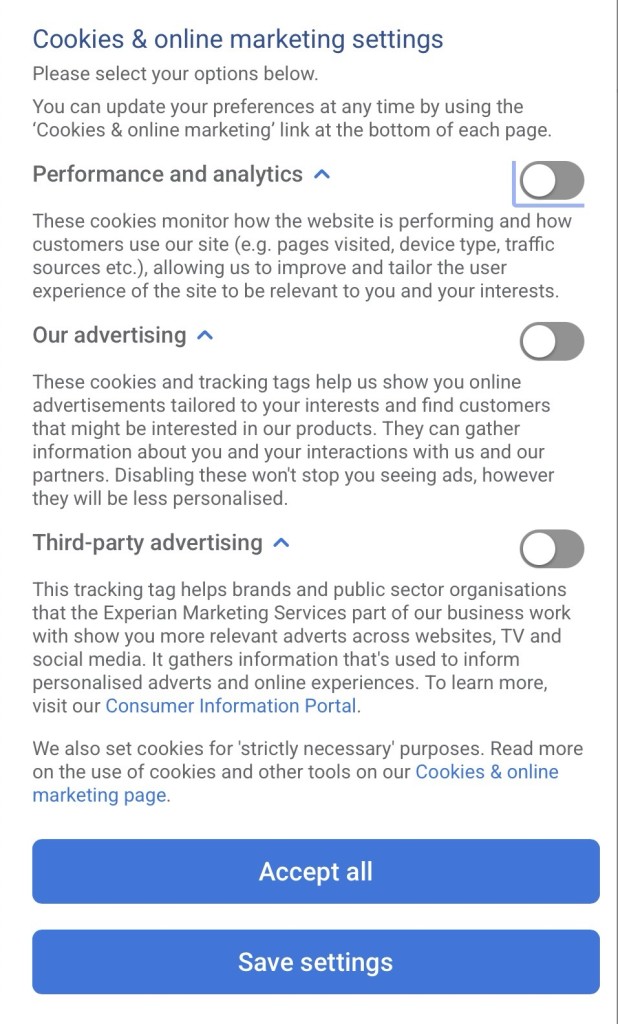
Screenshot Performance and analytics – OK, but the other two … no way! How could this be? I had to do some searching to find out that Experian (and a couple of other “credit reference agencies”) were also DATA BROKERS, and that they’d been hauled up about NOT declaring this part of their role in 2018. This appears to have been resolved now – because we are past the nine months they were given to clean-up their practices, but their other business purpose – sharing information with others would continue if you clicked on the Accept all button.
A real lesson learnt, with a secondary one being to engage brain before clicking on Accept all – the minimum requirement GDPR had imposed upon them and many others.
And what was the outcome of this. How had it come about, what is a “soft search”? The latter is explained on this page. How it had come about is more difficult to work out so this is just conjecture – our house insurance was about to come up for renewal and all 19 of the organisations who’d made an enquiry of our credit worthiness – or had been sent details of the upcoming renewal by Experian – were like these 9 …
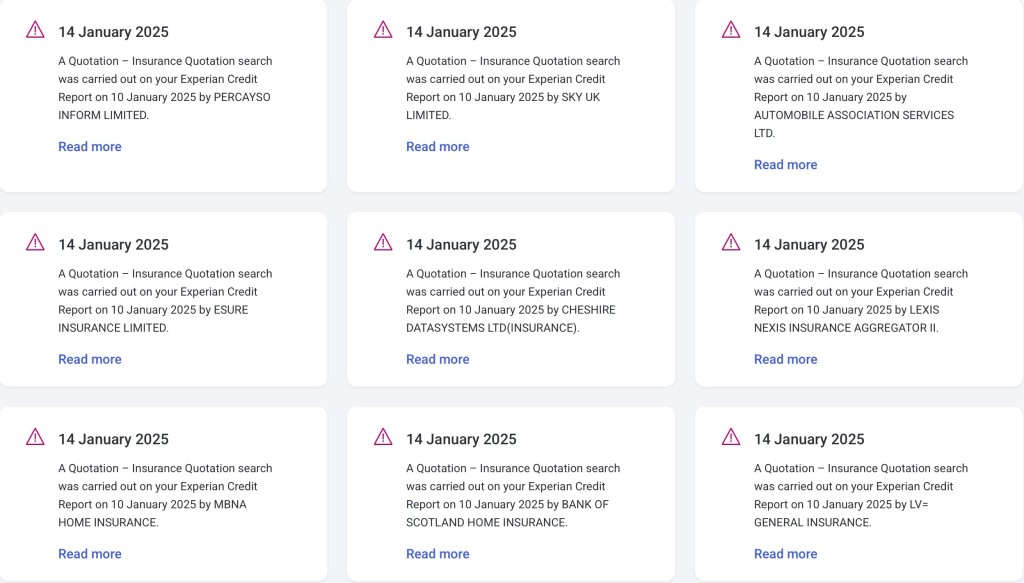
Screenshot … I leave you to draw your own conclusions.
-
Chrome settings on Windows
Again, this is a difficult decision on which Forum to post, but I settled on this one. You should read and consider whether the security issues it raises concerns you, or not, and take appropriate action …
-
What is a VPN?
Here’s a video that explains what a Virtual Private Network does. I use NordVPN, but I must remember to switch it off when in the house as it’s quite unnecessary behind my router. It is useful when travelling however, and some might say essential when cruising.
The second half is a bit techie and can be skipped if all you want to do is understand what it does and how it can be used.
-
A welcome addition to Signal – usernames as well as telephone numbers
You will soon be able to keep your mobile telno. private on Signal by using a username