
Always good to get a review of the latest scams, and to put your mind at rest too. I intend to write another post for the Cardiff u3a website soon, and this article will be useful background …
Tag: 2024
-
The drawbacks (possibly/allegedly) of entering the Apple ecosystem
I’m only posting this to indicate just how open and fair I am (HaHa) …
https://www.howtogeek.com/before-you-commit-to-the-apple-ecosystem
-
The Rule of Six:- Smart watches.
Remember the digital chip that was inserted into the Covid 19 vaccine….the one that would kick into action at some unspecified date and force you to do things that you might not have considered before? Mine forces me to buy tech products. That digital chip even knows my P.I.N. number. An Apple Watch was one of my most recent purchases but I might say that I’m absolutely delighted with the device. It looks after me; a bit like having Jiminy Cricket on my shoulder. It does things for me that are really useful, potentially even vital.

- It has a feature called Fall Detection. Those who know me will know that I’ve had a few falls over the last few years. I’ve sustained quite a few injuries including three broken ribs once. Believe me, falling over is no fun. Luckily, every time it has happened there have been kind Samaritans around, but what if I took a tumble whilst on a park walk, where there was nobody around? That is where Fall Detection comes in. The watch will know when you’ve fallen over. On the screen it will show a message, “You’ve fallen over. Are you O.K.?” You then have one minute to respond to that message. If you don’t respond within one minute, it will send for an ambulance, sending it to the GPS location provided by your watch. Here are a couple of videos. https://youtu.be/yZgzAhBa7Kc?si=2eTcmhPMFsJgIpKi. And https://youtu.be/OWasOBv15qk?si=zjaMW5gnKDcX8j2H
- Medical I.D. You can tell your phone and your watch your ailment and prescription details. Now, I know we should be wary of giving computers too much sensitive information but as far as I know, this information can be gained from my watch by medical professionals in times of trouble only.
- Health monitoring. The watch can give you all sorts of information about your health. This includes a step counter, sleep monitor, it can even monitor your walking steadiness. It is even said that it can detect atrial fibrillation although you might want to check that out yourself. The more expensive models have blood oxygen and ECG apps included. I went for the cheapest model, the SE second generation. (£219 at the moment). I think that is sufficient for my personal level of hypochondria.
- A torch. Nifty ! There are a couple of ways to get the screen to light up, giving you roughly the illumination level of a candle. Sufficient to help you find the toilet during night time excursions in unfamiliar hotel rooms. Use Siri (yes, the watch has Siri) and simply say ’Torch on’, or for Harry Potter fans, say ‘Lumos”. To switch off, simply place your hand over the watch face.
- Answer the phone. If your phone is in another room and rings, you can accept the call from your watch, speaking and listening to your watch. You can also send text messages to your watch using Siri.
- Alarm clock / timer. Simply ask Siri to set an alarm. It wakes you with vibrations on your wrist. This is actually a really pleasant way to be woken up.
Things to be aware of.
The Apple Watch works in conjunction with your iPhone. It won’t do much on its own.
I haven’t looked in to this, but I’m pretty sure that there are alternatives in the Android world that will do pretty much the same thing.
There are other, far cheaper brands of Smart Watch available. I tried a £40 model but I had to stop using it because it made my wrist itch.
Oh, and just one more thing, especially for the gentlemen in the group.
From How An Older Man Should Dress | Older Man’s Clothing Tips 2024
Older Man Clothing Tip #4: Own the Latest Technology
-
Scams – Part 1
[A short series of posts that I aim to also put up on the Digital Matters page of the Cardiff u3a website]
If you watched Rip Off Britain on January 15th [Episode 35 of Series 15 at c. 29mins 45secs into the programme] you will see an expert describe the Scam that one of our members has experienced recently and which has led me to write this post which may well be the first of a number on the subject of Scams.
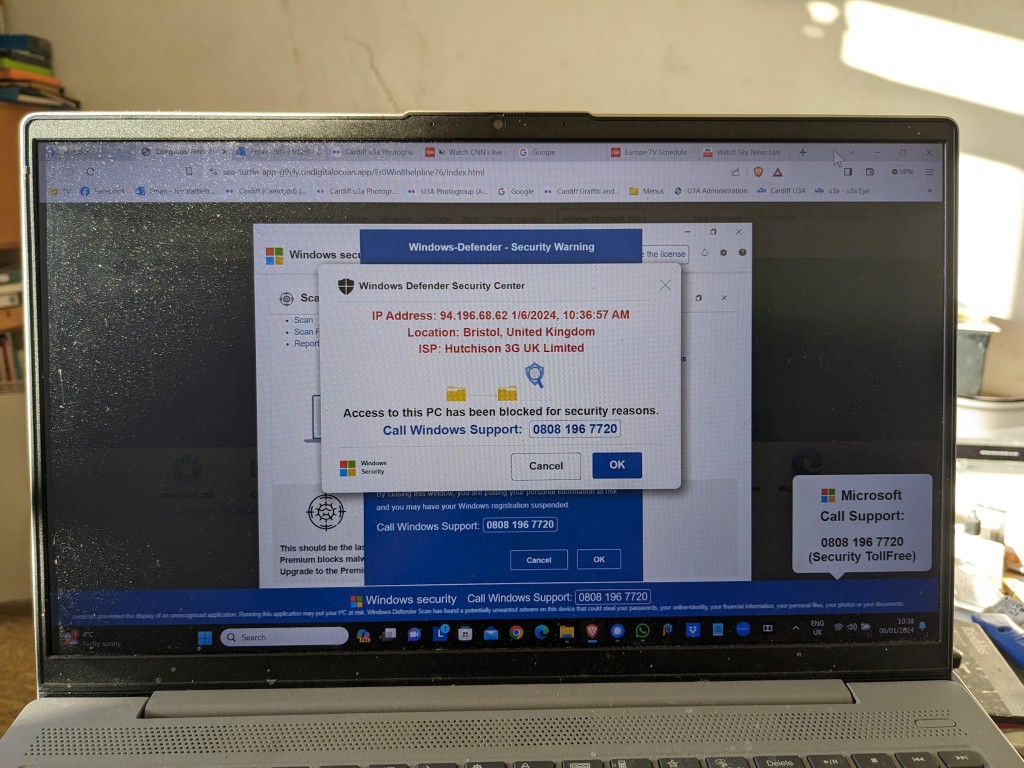
This scam manifests itself by your computer screen being taken over by a popup which also freezes your screen. You are instructed by a voice-over not to turn off your machine but instead to ring a telephone number where you will be “assisted” to unlock your computer which has been locked – in this case supposedly by Microsoft, but it could be any large tech company – for your protection.
This alarming message plus the fact that your screen has frozen may lead you into thinking you better click on the button to seemingly connect to Microsoft. This will lead to a telephone conversation where you will be requested to supply information that will undoubtedly lead to fraud.
Do nothing!
Note well: No tech company will approach you in this way. They will not be doing this form of online monitoring of your devices. In this case the scam is preying on the fact that you are being led to think that your Windows Defender Security package is not working properly. No tech company would readily admit to its users of a deficiency in their programs in this way – that could lead potentially to legal action being taken against them. For a genuine issue they might issue an alert on their webpages and a request to upgrade (or whatever), or they might be forced to send an email to registered users, but they would not send unsolicited messages in this way.
It is important to realise that with this scam, at this stage, the scammers know NOTHING about you. The scam works by malicious code having been added to a website you are visiting, or to an advert on the website you are visiting. The simple solution is to press F11 to unlock your screen, note the website address and make a note not to go to that site again. [I would probably also recommend clearing your internet cache and history from your browser before closing down your computer; waiting a few moments; and then re-booting it.]
The more long-term solution is to install an Ad Blocker such as AdBlock Plus as an extension to your browser. This would act in conjunction with your standard security software which on a Windows machine could well be Windows Defender.
Happy, safer surfing.
If you want to see the recording of the message that our Digital Matters member made of the scam, watch the video below …
