
Here are some notes from this meeting facilitated by Paul …
We looked at three items today:
TPS > joining, Reporting < Make a Complaint > and its effectiveness; some discussion on Nuisance communication, including Emails & PayPal Spoofs > report to Spoof@paypal.com
We looked at Google Maps, Locations, How to get Directions, add intermediate destinations, cross the channel to France….
Owen, David, Don, Ted and Jim collectively discussed my problem, and Jim came up with a solution to Bookmark the page & Route in Chrome.
Some discussion about downloading the routes to a Mobile from John Thorn (Alan Neave’s Brother in Law)
Ted (& Jim) introduced us to Street View History, that can go back 10 years for any location on GMaps by clicking the top Left dropdown box when in street view.
Ted will follow on with more interesting interfaces with Google Maps in two weeks.
We looked at Google Calendar and how it integrates across most platforms pretty easily.
Some discussion on Email services > Outlook , Mail, Windows Live Mail.
Tag: 2018
-
Meeting notes – 26th April 2018
-
Online buying and selling; Fb still in the news and meeting notes – 12th April 2018
Issues-
You can recall a message in Gmail for a limited time after you’ve sent it – as long as you’re using the browser version or the Gmail app; will not work with email clients, such as Outlook, or Apple Mac Mail.
-
Problems with Spam from BTinternet – investigated; could not find anything specifically that is a current problem.
-
How do you clone Mac – if you want to rebuild your system; resolved and answer given to Renee
-
Topics for the future
-
Cookies and internet history – managing them
-
Buying a new system; transferring your old system to a new one on a Windows PC. This has been covered for the Mac in response to Renee viz. cloning.
News-
Facebook still in the news – Mark Zuckerburg appears before Congress, will he come to Westminster? Nope!
https://www.facebook.com/settings?tab=privacy in a browserWhat do you use different forms of storage for?-
Internal hard disk drive
-
External hard drive
-
Solid-state drive
-
USB Memory Sticks, and Memory Cards (SD Cards, Compact Flash)
… and then there’s …-
Cloud storage
Topics -
-
Facebook issues and meeting notes – 22nd March 2018
Issues
- apart from getting onto Forum (see later) and the Broadband readings
News
- Facebook and Cambridge Analytica
- How to make yourself safe(r) on Facebook
- Another RSS Reader hits the dust – Digg dies
Broadband speed tests
Thought grazing and U3A Forum – demonstration
Next meeting – 12th AprilMeetings on 10th and 24th May – facilitator for these meetings -

ICE – that’s In Case of Emergency
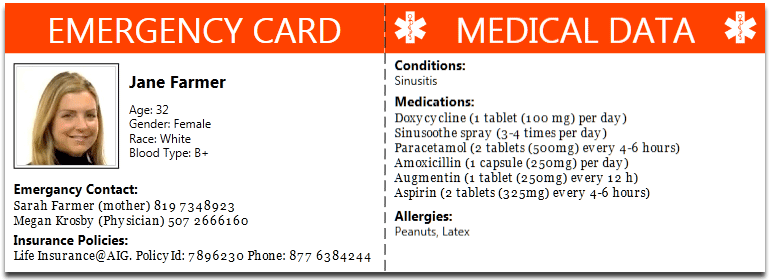
Recent discussion in U3A has been on what role a Group Convenor should have in case of emergency. It's a difficult one, I haven't fully resolved in my mind what responsibility I should have – I think it's one that's worth discussing. Should I, can I request that information be lodged with me? Should the group member provide it to a membership record on a database system that the Convenor can access? Or, should – and this is the purpose of this post – the individual take the responsibility upon themselves. This can be done by either carrying a card – this one is used by The Ramblers – there are many providers of this sort of card, eg ICEcard, or should we use the facilities on our Smartphones which allow access without unlocking the phone from the Home screen.
-
How much do you know about computer fraud?

Recently in a U3A meeting we discussed Computer Fraud. We often do, or so it seems. If it’s not fraud, it’s security online, or scams and what’s done with our data … but more about that later!!!
This short post is just to alert people to a simple, short quiz (or test) that has been produced in conjunction with the UK Government to help people recognise fraudulent activity.
Go to this website, satisfy yourself it’s genuine and is a government backed initiative, and take the test and see how you do. According to the Daily Mail – so it must be true – only 9% of people taking the test were able to accurately recognise all the scams and false messages, that despite a claim that 80% felt that they were able to recognise a fraudulent message.
For further guidance try this link. -

Windows 10 Maintenance – 8th Mar 2018
The internet was not made equal!!
http://www.speedtest.net/results
Task Manager – Alt-Ctrl-Delete
Processes Performance App history Start-up apps
Virtual memory – type Performance in search box, select Adjust the Appearance and Performance of Windows
Visual effects Advanced > Virtual memory – Increase paging area
System – select Gear wheel > System
Power and sleep Battery Storage
Uninstall Apps – select Gear wheel > Apps
Apps & features
Viruses and Malware – type Defender in search box
Windows Defender Security Centre
Clear caches in browser(s)
Safari Chrome
Improving system performance
Microsoft’s advice
Computerworld – 8 quick tips
Windows Central advice
Wintips advice
Make Windows start faster
Quick housekeeping guide
Checklist for a complete Windows cleanup
Windows Projects for a Weekend
Beginner’s Guide to Fixing Windows 10
Best way to clean Windows 10
Deleting old Update files
Slow boot times
Everything you could possibly want -
Thoughtgrazing, Forums, Buying an iPhone, online Fraud and Google Hangouts – 8th Feb 2018
Thoughtgrazing and Forums
http://digital.cardiffu3a.org.uk/
http://digital.cardiffu3a.org.uk/cardiff-u3a-computer-group/community/forums-and-topics/ – not active any more
Buying an iPhone (Marilyn), and a used one at that, contract free
The phone Jenny has is an iPhone SE, I have an iPhone 6s. Both of these (though not the latest models) are still obtainable from Apple, or from the Service Providers. So here are some links for you to chase-up. Unless you plan to hold a lot of photos/videos on your phone, I wouldn’t worry too much on having more than the minimum amount of memory (RAM).
You might consider buying a used model. This is a good article which explains the options. I can’t recommend, because I’ve never done it – https://www.macworld.co.uk/feature/iphone/how-to-buy-second-hand-iphone-3496606/.
However the Service Provider I use, and would seriously recommend using (GiffGaff owned by O2 and using the O2 network) do offer pre-owned phones and I would have no hesitation of thinking about buying from them – https://www.giffgaff.com/mobile-phones/pre-owned.
Can I also pleas stress that you should NOT consider buying a phone on a contract if you can at all possibly afford the up-front cost, as the long-term cost is SO much greater; the same goes for the instalment options. Your best option is a SIM-free purchase – I pay just £7.50 a month for my deal with GiffGaff, and I could quite possibly drop that down to just £5 per month.
So here’s the page for buying a phone from the Apple Store – https://www.apple.com/uk/iphone/ – you’ll see that both of our phones are still current models.
The iPhone SE – https://www.apple.com/uk/iphone-se/ – and The iPhone 6s – https://www.apple.com/uk/shop/buy-iphone/iphone6s
Please feel free to contact me again for further advice/guidance before you make a decision.
I think I may spend some time on this in the Computer Group on Thursday. Always a good topic.
GiffGaff and 3 (PAYG)
https://www.three.co.uk/Store/SIM/Pay_As_You_Go
https://www.giffgaff.com/
https://www.giffgaff.com/mobile-phones/pre-owned/apple
Fraud website from UK Gov
https://takefive-stopfraud.org.uk/
and course from FutureLearn
https://www.futurelearn.com/courses/cyber-security?
Hangouts (and also Chrome Extensions)
https://hangouts.google.com/ -

Decisions, decisions … Adobe Lightroom
A couple of U3A members have expressed an interest in purchasing Lightroom. It’s a confusing time in the Adobe world at the moment and the window for purchasing a stand-alone desktop version of the software (Version 6) is possibly closing, possibly … I don’t know!!
Adobe wants its users to move on to a Subscription-based Photography Plan which includes access and use of Photoshop as well as Lightroom, or alternatively a new Lightroom Creative Cloud Plan that is cloud-based with loads of cloud-storage and access to just Lightroom.
I decided to join the original plan about two years ago, and I hadn’t regretted it (until recently), but it does involve an ongoing commitment of c.£10.10 (currently) per month to allow you to keep editing your photos. If you cancel your subscription you can still access them, but the main editing functions are disabled. On the plus side you are provided with all the updates and new versions of the software whilst you still pay your subscription. As it was the main piece of photo software I used – it was a no-brainer for me back in 2015.
When I moved from Lightroom v.5 back in 2015, I opted for the Adobe Photography (20Gb) Plan Creative Cloud subscription. This is obtained from this link.
However beware. Adobe are pushing the cloud based service, rather than Lightroom as a desktop application, and are confusingly using the name of the old subscription Desktop application – Lightroom CC – to describe the mobile-world, cloud-based version which they are trying to push to the consumer market.
The desktop application is however ALSO part of the Photography Plan and IN MY HUMBLE OPINION this is the one you should be installing if you opt for the Photography Plan. It’s NOW called Lightroom Classic CC. This is the version that I upgraded to in the New Year – you could call it Lightroom 7.
However, as I said at the top of the message; if you just want a standalone, one-off purchase of Lightroom v.6 with a CD, it’s still available from Amazon for instance (also John Lewis, Curry’s and PC World I believe), or from Adobe direct.
Installing the standalone version from Adobe is relatively straightforward. You need to create an AdobeID as part of the process, and then you get a Licence Key. If you want to save c.£6 and NOT have the CD you can get it as a download to install the software – see the links from the Amazon page to get the “ xxx Activation code by email” version.
If you have an earlier version of Lightroom (e.g. v 4 & 5) you can upgrade it from this link and save yourself about 50% on the purchase price of Lightroom v.6, and if you’ve installed the Lightroom CC trial here’s a link if you want to change to Lightroom v.6.
Now this is important. Lightroom v.6 will not be upgraded in the future. It is not straightforward to go back to Lightroom 6 from Lightroom Classic CC (v.7) without losing some of the information you’ve applied with that later version. However for the amateur photographer there is plenty in Lightroom 6 and unless you’re thinking of buying some very expensive camera bodies and lenses in the future you probably won’t suffer from just using Lightroom v.6.
Installation assistance for Lightroom 6 is provided here.
If you decide to go down the Creative Cloud subscription route (as I did initially), you should be careful during the installation process, and you may find it useful to follow the assistance provided in this link.
If you want to ask me any questions before making a decision, don’t hesitate to do so, it will be my pleasure to try and answer them. If I can’t answer the question I will point you to a link which I think will answer the question.
So what is my recommendation? This matter has taken up a lot of my time just recently and I’ve agonised over the decision I should make. You can read about my reasoning and the decision I eventually made to probably stay with Lightroom v.6 whilst trying out Lightroom Classic in this blogpost.
