Category: Apple Pie

  • iCloud Photos, Photos on Apple Devices and iCloud Drive

    The seed for this topic was sown by Ian at our meeting on October 13th 2022. I had to admit that although I had a reasonable idea of what happened with Google Photos, I was unsure what happened with Apple’s cloud offering.

    I was reasonable quick in advising (and it’s reported in the notes of the meeting), that as expected …

    “I can confirm that deleting a file on iCloud Drive from the Files app on an iPhone will delete it from icloud.com and your iCloud drive on MacOS as well – which is what you would expect should happen.”

    However, the situation of Photos stored in the Apple Photos app (on iPhone or iPad) and iCloud Photos should also be noted – for completeness.

    I’m not going to write anything; just provide three links to follow to clarify …

    How to Delete Photos From iPhone but Not iCloud

    How to Delete Photos From iCloud (While Keeping Them on Your iPhone)

    and

    How to recover a deleted photo or video on your iPhone or iPad

    If you want to delete a Photo from both device and iCloud Photos. Just ensure Sync is left on and then you can delete the image from either the device or icloud.com

    Having confirmed all this, and having more storage space on iCloud, and understanding that sharing Photo Albums is about to come to Apple Photos, and having checked that Sync’ing does seem to be working for iCloud Photos (from my Apple devices), I checked my Google Photos settings settings and switched-off Back up and Sync. I was doing far too many cloud backups!!! Always worth checking. If I want a Photo to be on Google Photos (for sharing for instance), I will now Upload, not rely on syncing.

  • Protected: Screen Prints

    This content is password-protected. To view it, please enter the password below.

  • How safe are iPads and other tablets without additional software protection?

    A good question! I certainly can state that mobile banking is safer from a mobile device than from an internet browser because the latter can be compromised because it’s more open to the internet and issues that you install anti-malware software to protect you.

    I would judge that the fact that as all software downloaded onto these devices go through a “shop” maintained and supported by the hardware vendor that they have done checks on the software and the supplier before releasing it through the shop. That’s a very powerful first step and is why I’m a strong supporter of these “shops” and would be distressed if some alternative means of downloading software onto a mobile device was allowed.

    However, nothing protects you against yourself and that’s where the hints and tips in the third part of my “Protect yourself online” talk come into play.

  • Do you need to use anti-virus software on a Mac?

    Probably not.

    I’ve just loaded Malwarebytes on our iMac and MacBook Pro computers – provided by our bank – and only found one piece of tracker code, on one machine, which was very old and most probably not active. I deleted it.

    Macs have a very good history of not being hacked, and when they are they close the problem down very quickly. This is a benefit of Apple owning both the hardware and software and being able to control which of the latter is installed on MacOS.

  • Protected: Covid-19 Tracing app

    This content is password-protected. To view it, please enter the password below.

  • Microsoft re-enters the browser war!

    After Netscape Navigator was eclipsed by Microsoft’s  Internet Explorer as the browser of choice for many – mainly because it was hard-wired into Windows initially – the world of internet browsers has seen first the rise of Firefox from the Mozilla Foundation as an alternative open source option and then the succession to Google’s Chrome and it’s huge market presence.
    I’ve written about Google’s dominance and the alternatives to Chrome before in “Just Google it …”
    Now Microsoft has stirred from its inactivity in the browser market place. It has ditched its proprietary Edge browser and replaced it with … Microsoft Edge. No confusion there then!
    It is interesting because it will run on MacOS as well as Windows, something the old Edge didn’t do, and will use the same open source code base – Chromium – as Google’s Chrome and of course Brave (my browser of choice). This allows them to use Extensions written for that code base. I already use many extensions written for Chrome in my Brave browser.
    What will this mean for Google especially as Microsoft Edge will effectively have a built-in ad-blocker? Who knows. It’s certain that as more users decide to use the Microsoft version of Chromium, so Google’s business model and revenue stream will come under attack. Will they retaliate in some way? Probably not. Interesting times.
    Here’s an article that describes keyboard shortcuts that you can use with Microsoft Edge.

  • Watch out for Catalina!

    Watch out for Catalina!

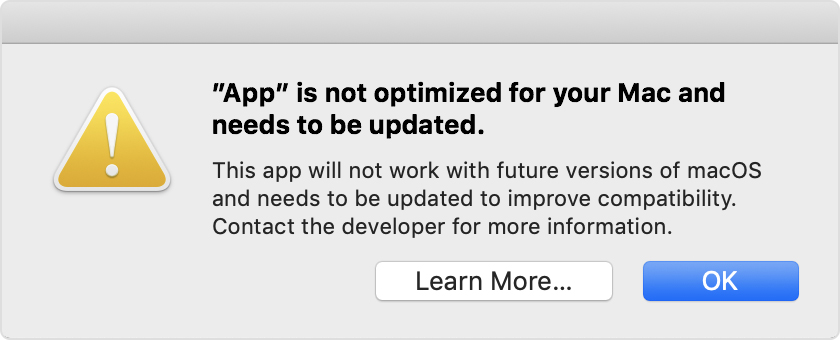
    I was asked last week about a message that had appeared on a Lightroom 4 users’ screen with this warning …

    … scary eh!?
    Well yes it is but if you’ve got a relatively new Mac you do have the choice NOW of making sure you have the latest version of software that will support older versions of Lightroom, and do an upgrade to Mojave (v.10.14) BEFORE Catalina (v.10.15) is released later this year – probably in October. That way you’ll be nearly up-to-date with your version of MacOS and that may be sufficient for you if you don’t feel the need to have the latest version of MacOS.
    If you have Lightroom 6 installed (or even 3, 4 or 5), you may be getting the message above EVEN THOUGH it is a 64-bit app. This is because the Installer/Uninstaller and Activation code software is 32-bit. That means the software “should” continue to work, but you won’t be able to re-install it to a MacOS of Catalina (v.10.15), or later.
    The only other alternative if you want to stick with Adobe Lightroom is to swallow hard and subscribe at £9.98pm to the Photography Plan of Adobe’s Creative Cloud programme. You do get Photoshop as well as what Adobe call Lightroom Classic, plus their in the cloud version of Lightroom which they (confusingly) call Lightroom!
    Adobe detail the changes and implications in this blog post. Another post from Laura Shoe Training gives more information here.
    UPDATE: I’ve just read this really useful and interesting article from the magazine MacWorld – I suggest you read it too – and I’ve found out that Microsoft 2011 and Picasa (amongst others on my iMac) will not work with Catalina. Whilst I’m not particularly concerned about losing either of these as there are alternatives I’m already using – such as (in the case of the former) Google Docs, Open Office, Libre Office or Apple’s Pages, Numbers or Keynote applications – it’s better to be prepared and to have made the decision to move before I have to jump! Also in the case of Picasa, that I haven’t got anything in the database that I haven’t catalogued elsewhere – I think that unlikely, but I ought to check!
    I’ve also stumbled upon an entry in “About This Mac > System Report …” which you get to from the Apple Icon in the top-left corner of your desktop. Go to Software and if you’re running Mojave there’s an entry called Legacy Software. Look at that and you’ll be able to see quickly what software is unlikely to work in Catalina. If you’re running an earlier version of MacOS go to Software and click on Applications and look for non 64-bit applications (a column to the right of the window).
    Other links worth following …
    MacOS 64-bit – what it means to you
    32-bit app compatibility for Macs with current Mojave operating system


  • Protected: Sound session – 25th July 2019

    This content is password-protected. To view it, please enter the password below.

  • A satisfying and pleasant end to a trying day.

    You’ve got to hand it to Apple. They do look after their customers well – at least this one they do!
    You may remember I’d been having trouble with the boot-up of my 2013 iMac – yes, it’s at least 5 years old. It’s a powerful machine which I bought to do photo work and it’s been a delight, but the problems reported here …
    I’ve now had an introduction to the SBOD
    … had come back this month. After a couple of attempts to fix the problem myself, which I had assumed to be software problems, which involved me re-installing the operating system on a completely clean disk (ie I had to re-install all my data and applications from backup which was painless and automatic, but took a bit of time), I contacted their support via online chat, and after Traci had exhausted everything she could remotely, I was referred to the Genius Bar in the local Apple Store for an appointment that same day (actually 18:45 in the evening). A very competent and pleasant hardware technician (David) did “triage” on the machine and announced that the Fusion Drive was in fact faulty – it was a hardware problem.
    And … they offered to replace and repair it at no cost to myself as I’d bought it from Apple, not elsewhere.
    That’s the way to create brand loyalty. Thanks David. Thanks Apple Store, Cardiff.

  • Is it time to move to more paid subscription services?

    Is it time to move to more paid subscription services?

    I have to admit, the events of the past few weeks have made me look much more seriously at paying more for the IT services that I’ve taken for free up until now. Of course they’ve never been free, I’ve had to put up with the adverts and the email messages I don’t really want – alerting me to this deal, or that deal, and I’ve willingly put up with that as a price worth paying for the service I’ve been receiving. But two events have changed my mind, and moreover I feel the IT world is actually changing slowly as a consequence of the mistakes (to be exceptionally generous) of Facebook and Google; and the decision of Apple to switch more attention to Services, targeting this as their  main income stream for the future, and not relying on Hardware alone.
    So what were the earth-shaking events in the Harrison-IT-world? Well the first was Google’s announcement that having hidden the news of a potential security weakness in an API, for several months (presumably to secure their stock-market price at the time Facebook was struggling, and presumably also after ensuring that the potential breach was secured) they used this as an excuse to kill-off (sorry “sunset”) Google+ next August. Now this service was not the success Google hoped it to be, and most definitely has not generated the revenue they hoped it might, but for me, my family and for many communities (particularly of photographers – because of the close linkage to Google Photos) – it was a hugely valuable tool. Now, we have to look for another social media platform. It could be Google Photos – Google may have plans to “enhance” it to take on features from Google+, or it could be another platform, but it’s just a pain in the neck having to move off something we’re used to! Google have real history with “sunsetting” tools that people get used to using [Thanks to @MrSimonWood for this link.]
    The second was Flickr’s announcement that they were going to limit their Free account to 1000 images – excluding those that were licensed under Creative Commons, which a lot of mine are. They are encouraging users to take out a Pro subscription to remove restrictions and allow more and larger images to be uploaded. This didn’t meet with the same “horror” feeling. I immediately felt that this was a decision that would secure the future long-term of the service under the new owners – SmugMug. [A feeling that I didn’t have when 500px made changes to their platform which led me to delete my account.] So I immediately subscribed and took advantage of the first-year discount price (still available for a few more days I believe).
    So what am I saying. I’m saying that if there’s a service that I really want, and I really need some feeling that it’s going to be around for a while, I should pay for it. I wasn’t given that option by Google – shame on them; it appears I’ll never be given that opportunity by Facebook. Both of them are essentially marketing and advertising platforms. I don’t see either of them being able to develop a hybrid model as Flickr has been able to do.
    This all makes Adobe’s Creative Cloud Photography Plan and Microsofts’ Office 365 seem so much more sensible. I’ll continue with the former, but decline the latter as my roots are now firmly planted in the Apple world where I look to see how they will develop their Service offerings in Music, TV, Home and Car fields.
    Interesting times.